
No. Banana Gun and Banana Gun Pro do not let you export or retrieve a private key, because the key is shown once, when the wallet is created.
The docs FAQ puts it plainly: "You can't. Banana Gun doesn't provide an option to retrieve your private key."
It adds: "When generating a wallet, securely save your private key, it cannot be recovered. Never share it."
The Banana Gun Pro FAQ says the same thing for the web app.
So the useful question is what you can do. Below you will save the key at creation, import a wallet whose key you already hold, move funds out if you never saved it, and lock down access.
Step 1: Save the key the moment you create a wallet
You get exactly one chance to see the key, so treat wallet creation as the moment you write it down. The Telegram bot and Banana Gun Pro use different buttons for it.
1. Open Wallet Setup in the bot. Open the bot at https://t.me/BananaGun_bot, select EVM or SOL, then click Wallet Setup.
2. Click Create Wallet and name it. Click Create Wallet and enter a name for the new wallet.
3. Save the key. The docs say to save it in a secure location, because it will only be shown once. Copy it somewhere you control before you move on.
4. On Banana Gun Pro, click GENERATE WALLET. Click GENERATE WALLET on the Trade or Trenches pages. If you already have a wallet, select ADD WALLET in the WALLETS widget, then choose GENERATE WALLET, and follow the prompts to save the key.
The Banana Gun Pro docs warn that you will only see your private key once, so save it offline. Without it, you permanently lose access to the wallet.
Our guide on how to buy meme coins says the same: the key is shown once, and Banana Gun cannot show it again.
Step 2: Import a wallet whose key you already hold
If you want a wallet whose key you can always get, bring in one made elsewhere. Phantom is the example the docs use, and it lets you reveal its own key.
1. Export the key from Phantom. Open Phantom, click the account icon in the top-left corner, then scroll down and click the pencil icon, Manage Accounts.
Select the account you want. This is Phantom's feature, not a Banana Gun one.
2. Reveal and copy it. Click Show Private Key, enter your Phantom password, and copy the key. Anyone holding the key controls the wallet.
3. Import it into the bot. In the bot, select EVM or SOL, click Wallet Setup, then click Import Wallet.
Enter a name for the imported wallet, then enter the private key. Existing positions from that wallet appear in the Positions panel.
4. Or import it into Banana Gun Pro. Select ADD WALLET in the WALLETS widget, then IMPORT WALLET.
Paste your private key and follow the prompts. The wallet then appears in the WALLETS widget.
Step 3: If you never saved the key, move your funds out
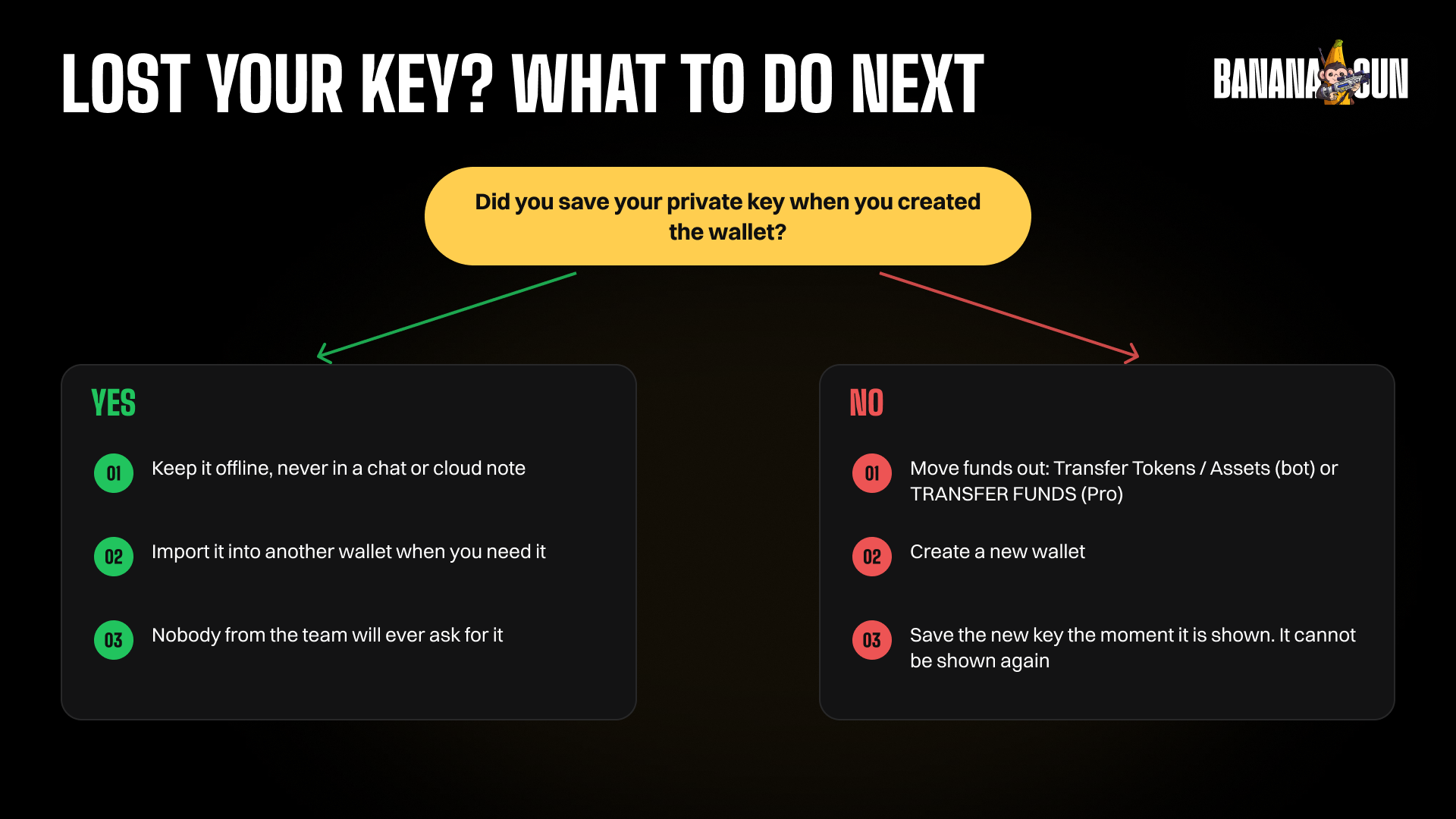
If the key was never saved, you cannot get it back. You can still move the funds while the wallet exists.
1. Open Transfer Tokens / Assets. In the bot, select EVM or SOL, then click Transfer Tokens / Assets from the Wallet Settings panel. On EVM, pick the chain you want to transfer on.
2. Choose the asset and both wallets. Select the asset, then the wallet to send from. For the destination, select Custom Wallet and paste the address of a wallet you control, where you already hold the key.
3. Enter the amount and leave gas. Enter the amount, and make sure you leave enough of the chain's native token to pay gas fees.
4. On Banana Gun Pro, use TRANSFER FUNDS. Select TRANSFER FUNDS and follow the prompts. To send funds outside Banana Gun Pro, enter a public address in the WALLET ADDRESS field.
Full guide: how to withdraw from Banana Gun.
Step 4: Lock down access
These are the controls the docs describe.
1. Never hand over your key. The docs hint says: "Sharing your private key is the same as handing over your wallet and all your funds." The Banana Gun team will never ask for your private key.
2. Set a Security PIN in the bot. The docs say a PIN protects access to Banana Gun between sessions. Click Set Security Pin, and the bot locks after each session until you enter it.
Type /refresh to extend a session about to expire.
3. Set a PIN on Banana Gun Pro. Open GLOBAL SETTINGS from the USER drop-down, then SECURITY SETTINGS.
Enter NEW PIN and CONFIRM PIN, then click SETUP PIN. It becomes active in 8 hours.
4. Turn on 2FA for your login account. The docs tell you to enable two-factor authentication on the Google, Telegram, or Twitter account you use to access Banana Gun Pro. If someone gains access to that account, they could compromise your wallets and funds.
For a wider look at the risks, read are Telegram trading bots safe.
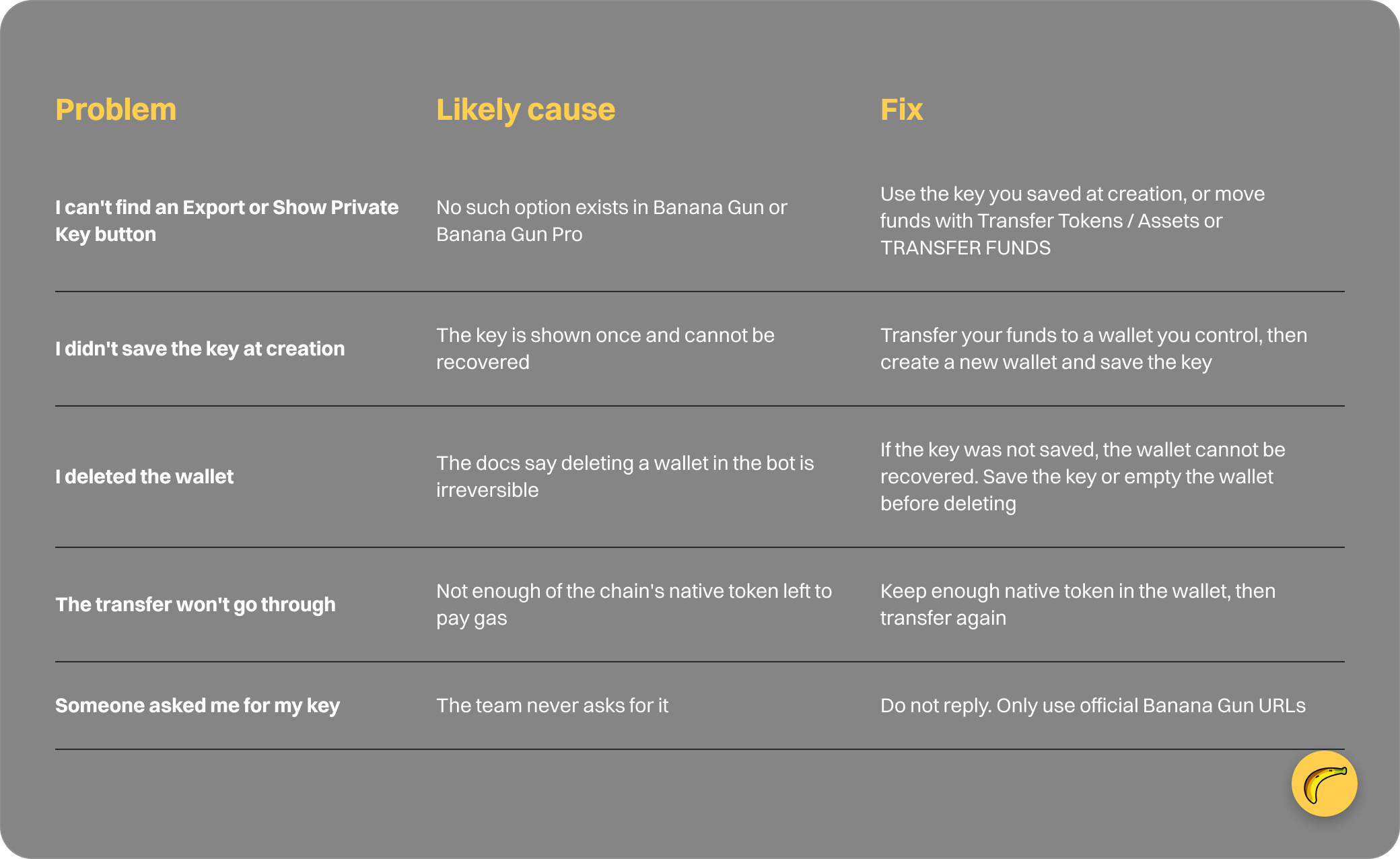
Why it failed: common private key problems
Frequently asked questions
How do I export my private key from Banana Gun?
You can't. The docs FAQ says Banana Gun doesn't provide an option to retrieve your private key, and it cannot be recovered. Save it when you generate the wallet.
Can Banana Gun support recover my private key?
The docs describe no recovery route. They say the key cannot be recovered and that the team will never ask for it.
Can I get my key back from Banana Gun Pro?
No. The Banana Gun Pro FAQ gives the same answer: it doesn't provide an option to retrieve your private key, and you only see it once.
Can I use the same wallet in Phantom and Banana Gun?
If the wallet is in Phantom, you can export its key from Phantom and import it using Import Wallet in the bot or IMPORT WALLET in Banana Gun Pro.
What happens to my funds if I delete a wallet?
In the bot, deleting is irreversible, and the docs warn that without a saved key the wallet cannot be recovered. Empty it or save the key first.
Start with a wallet you can always reach
Create a wallet, save the key straight away, and set a PIN. If you are new to the bot, make your first trade after that.
Open Banana Gun at https://t.me/BananaGun_bot and set up your wallet properly the first time.