
A honeypot token is a contract that lets you buy but stops you from selling, or taxes your sell so heavily that the exit is worthless. Read the contract on a block explorer and confirm the tax before you size in.
Banana Gun is where you watch the tax: it shows a token's tax when you paste the contract, and lets you set tax limits. That is one signal, not a full check. For Solana tokens, use the Solana honeypot checker guide instead.
How do honeypot tokens trap you on EVM chains?
An EVM token is a smart contract, and the deployer writes the rules for who can move it. A honeypot hides a rule in that code that only bites when you try to sell.
The buy looks normal. The chart climbs because only buys succeed, which draws more people in.
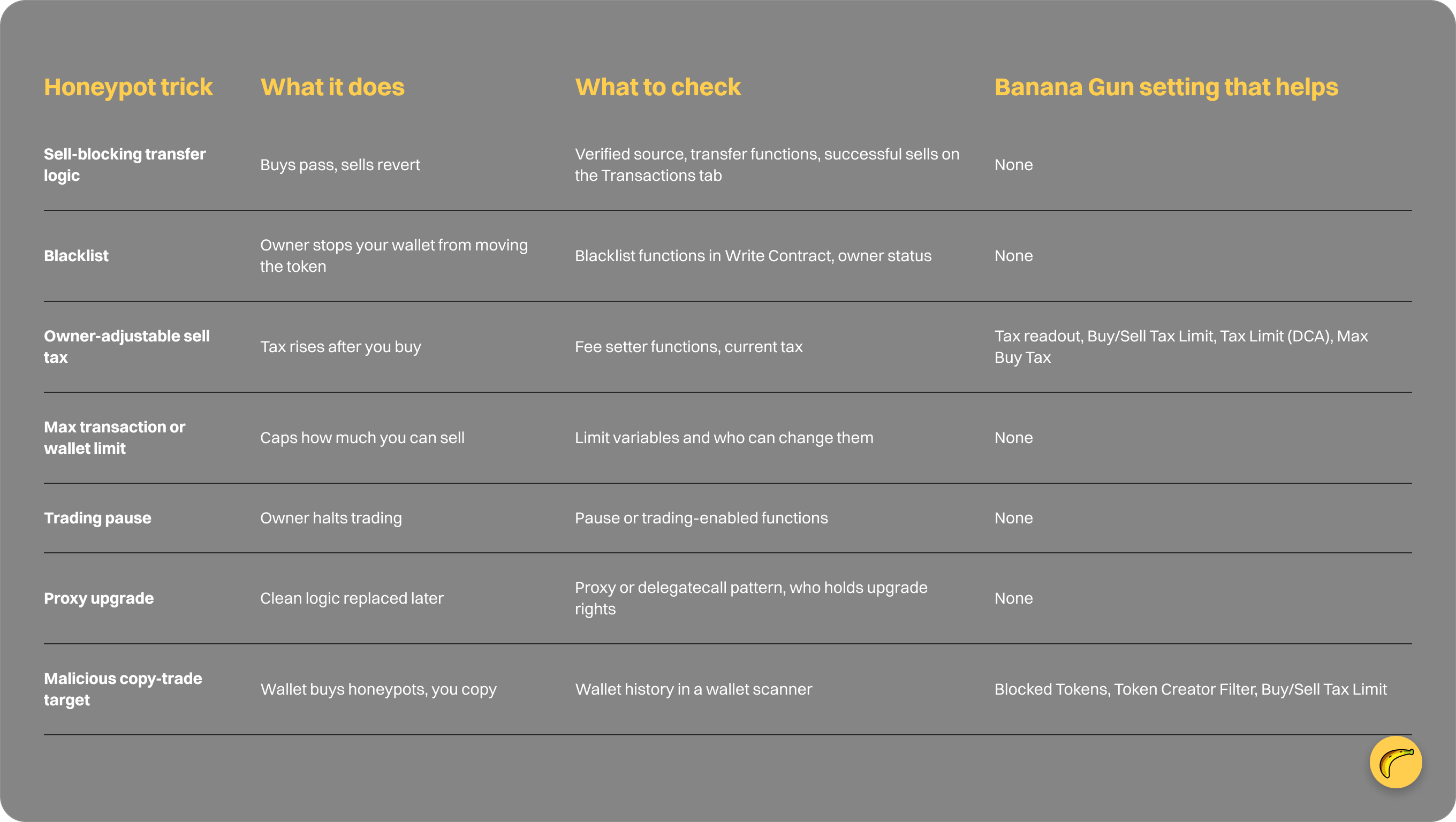
- Transfer logic that blocks sells. The transfer function checks a whitelist, a blacklist or a hidden "trading enabled" flag. Buys pass and your sell reverts.
- Blacklist. The owner adds your wallet to a mapping that the contract checks on every transfer. Once you are on it, you cannot move the token.
- Owner-adjustable sell tax. The tax reads low when you buy. After you hold, the owner raises it to a near-total percentage, so the sell works and returns almost nothing.
- Max transaction or max wallet traps. A sell limit is set so low that you can exit only a sliver of your position, and the owner can change it.
- Trading pause. The owner flips a switch and trading stops for everyone but the owner.
- Proxy upgrade. The contract looks clean when you read it. Later the logic is swapped for a version with one of the traps above.
A liquidity pull is a rug pull, a different thing. A honeypot can sit on full liquidity, because the trap is in the contract, not the pool.
How do you check a token on a block explorer?
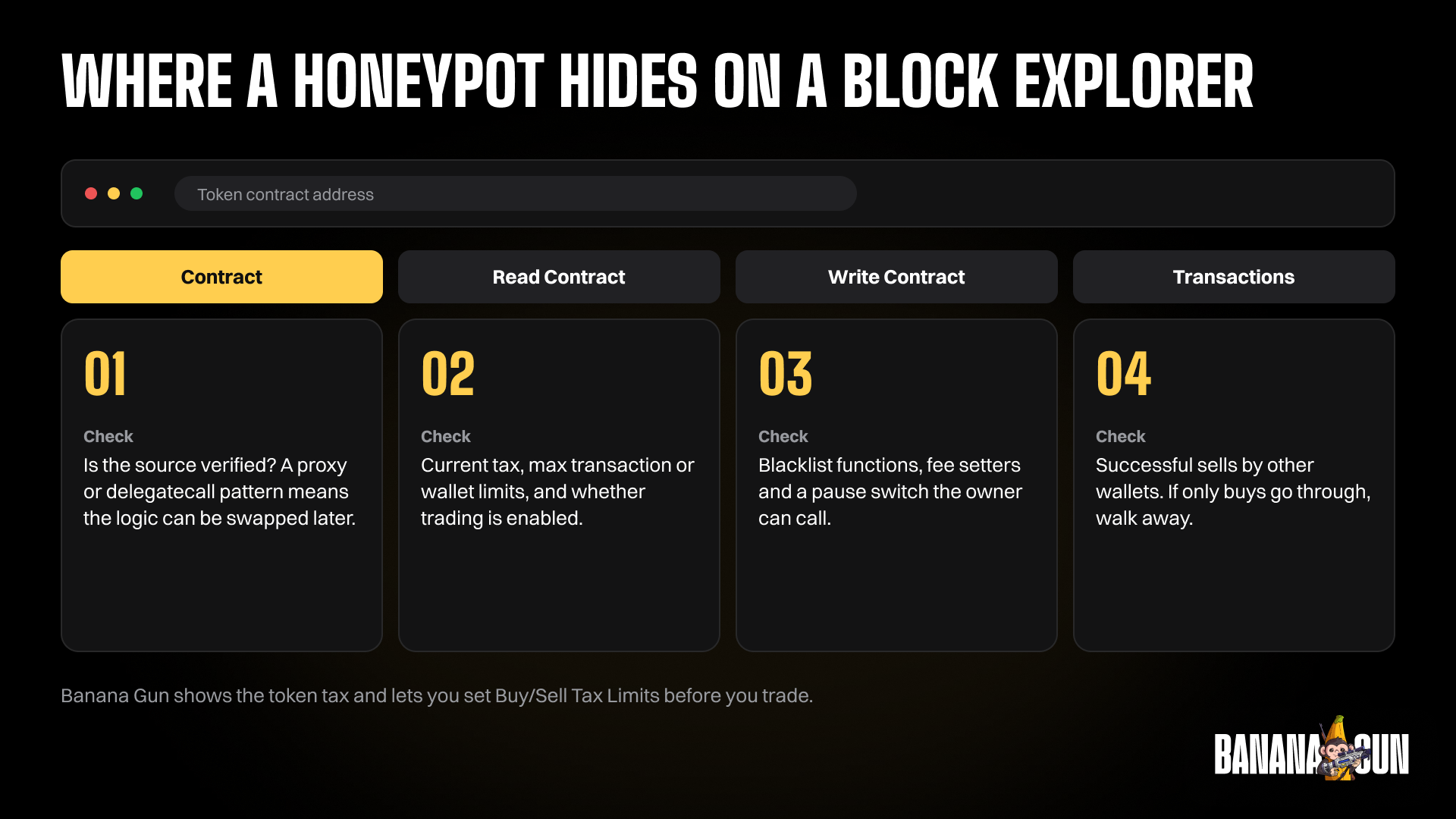
Use Etherscan for Ethereum, Basescan for Base and BscScan for BNB Chain. The steps are the same on all three and take a few minutes.
- Confirm the address. Copy it from the project's official channel, not from a search result or a reply.
- Check that the source code is verified. On the Contract tab, verified code is published and readable, and unverified code is a reason to skip.
- Read the owner and the functions. Under Read Contract and Write Contract, look for an owner address and for functions that set fees, set limits, blacklist wallets or pause trading.
- Check ownership. A zero-address owner means ownership was renounced, which removes the owner-only traps, though a proxy can still change logic.
- Check the holders. On the Holders tab, one wallet holding most of the supply is a warning, and so is liquidity held by an ordinary wallet.
- Read the Transactions tab for sells. Dozens of buys and no successful sells from different wallets is the clearest sign.
To go deeper on the code itself, the beginner's guide to reading a token contract covers owner functions, fee setters and proxy patterns.
What is a test sell, and does it work?
A test sell means you buy a tiny amount, then try to sell it before you commit real size. If the sell goes through and the amount you receive matches the tax you expected, the token passes that one test.
It has limits. You pay gas on both sides, and a failed sell costs you that gas. It also proves only what was true at that moment, because an owner who can raise the tax or blacklist wallets can change the result after your test.
A failed transaction is not proof of a honeypot on its own. The Banana Gun docs say failed transactions usually come from insufficient gas during network congestion, or from price changes that exceed your slippage tolerance.
Do not answer a failed sell on an unknown token by raising slippage. Read the slippage explainer first, because higher slippage means a worse fill, and a real honeypot will still not let you out.
How do Banana Gun tax limits and filters help?
These are the tools you use against high-tax traps, set before you trade rather than after.
- Tax readout on buy and sell panels. The buy panel shows the token's buy tax when you paste the contract, and the sell panel shows buy (B), sell (S) and transfer (T) taxes.
- Buy/Sell Tax Limit in copy-trade Advanced Settings. It prevents buying or selling tokens with taxes above the limit. Set 10% and a target buys a 15% tax token, and your copy trade fails.
- Tax Limit on DCA orders. It sets the maximum token tax allowed for a DCA order to execute.
- Max Buy Tax on the Sniper panel. If the buy tax is higher than your maximum, the order stays pending.
- Blocked Tokens in copy trading. You paste a token address and it is not copy traded.
- Token Creator Filter. You use Add Allow or Add Deny to include or exclude token creators.
The docs also carry a warning on copy trading. Target wallets can turn malicious and try to drain you through pump and dumps or honeypots, so use a wallet scanner to review a wallet's recent trades first.
A tax limit reads a tax number and nothing else. A blacklist, a pause switch or a proxy upgrade can block your sell while the tax still looks fine.
Which honeypot trick does each check catch?
FAQ
Can you sell a honeypot token?
Usually not. Some block sells outright, and others allow a sell but take nearly all of it in tax.
What is the difference between a honeypot and a rug pull?
A rug pull removes the liquidity, so the price collapses. A honeypot keeps the liquidity but blocks or taxes your sell through the contract code. You can be hit by one without the other.
Does a verified contract mean a token is safe?
No. Verified means the code is readable, not fair. It can still contain a blacklist, an owner-set tax or a pause function.
Which Banana Gun tools help against high-tax traps?
The Tax readout shows a token's taxes at paste time. Tax limits cap what you accept on copy trades, DCA orders and launch buys, and Blocked Tokens and the Token Creator Filter keep unwanted tokens and creators out of copy trading. For the wider picture, see are Telegram trading bots safe.
Trade with the tax in view
Paste a contract into Banana Gun, read the Tax line before you buy, and set a tax limit that matches the risk you accept. Start at https://t.me/BananaGun_bot.