
The Robinhood Chain explorer is robinhoodchain.blockscout.com. Paste a token contract, wallet address or transaction hash into its search bar and it opens the matching page.
You need the explorer because a token name or ticker proves nothing on this chain. One search for VRAX on 1 October 2026 returned at least five different contracts.
You need a browser and the address you want to check. The last step carries a checked address into Banana Gun.

Step 1: Open the explorer
1. Go to the official address
Open robinhoodchain.blockscout.com. Robinhood's docs list it as the chain's block explorer, and Blockscout calls itself the official explorer. Type the address yourself or use the link from Robinhood's docs.
2. Read the stats row
The home page header reads Robinhood Chain explorer. Under the search bar sit Latest batch, Average block time, Total txns, Total addresses and Gas tracker.
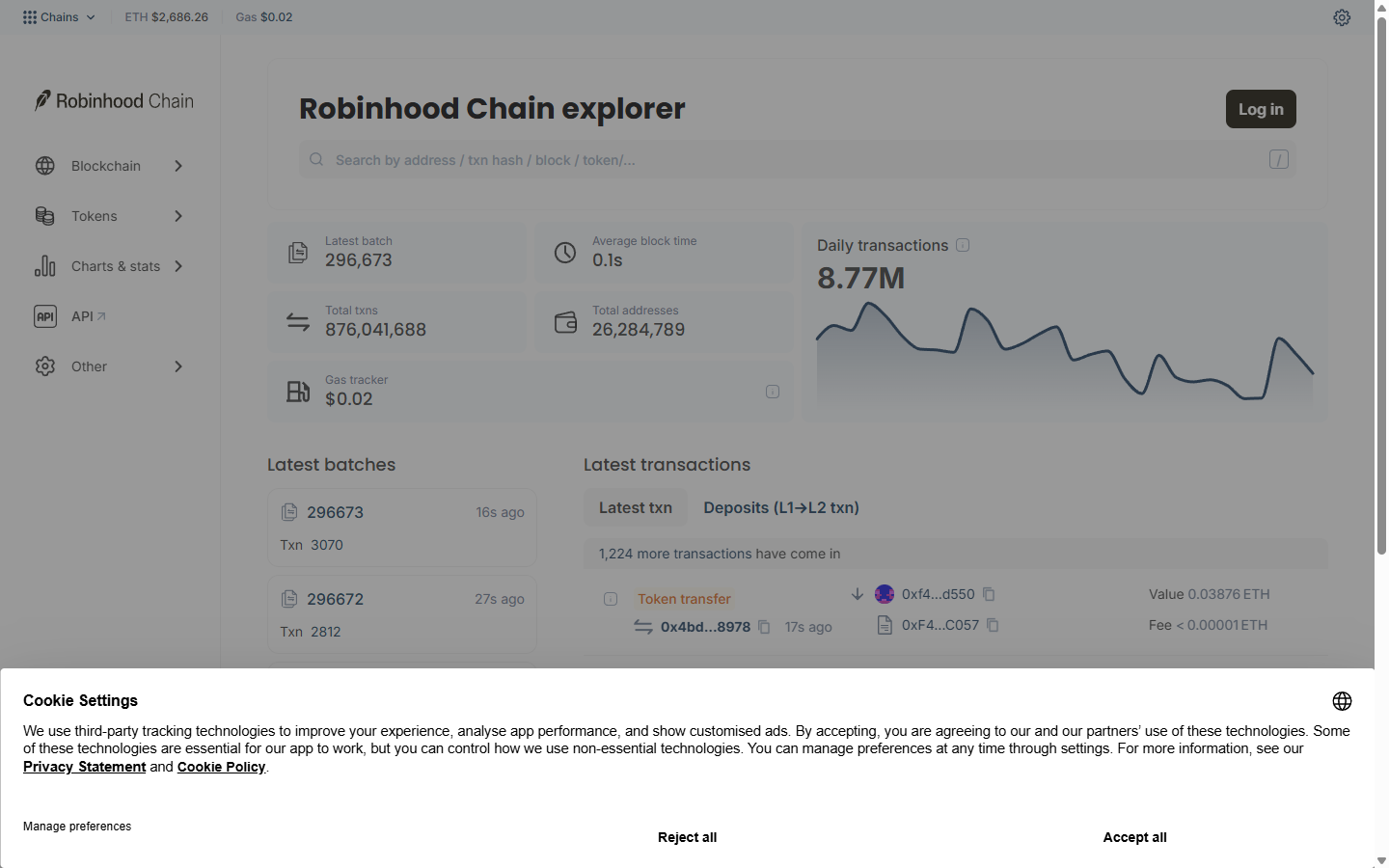
Robinhood Chain explorer home page with search bar, chain stats and latest batches, 1 October 2026
Example: on 1 October 2026 the page showed an average block time of 0.1s, 876,041,688 total transactions and 26,284,789 total addresses.
3. Spot the Robinscan link in the bot
The bot's bridge confirmation shows a link labelled View on Robinscan. This guide uses the Blockscout explorer, which Robinhood's docs list as the chain's block explorer.
Step 2: Search for what you want to check
1. Click the search bar
The bar at the top of every page reads "Search by address / txn hash / block / token/...". One box takes an address, a transaction hash, a block or a token.
2. Paste the full address or hash
Paste the whole contract address, wallet address or transaction hash from your trusted source. Press Enter.
3. Read the results list
A search by name returns a table with the token name, the address and a category column. Treat it as a list of candidates.
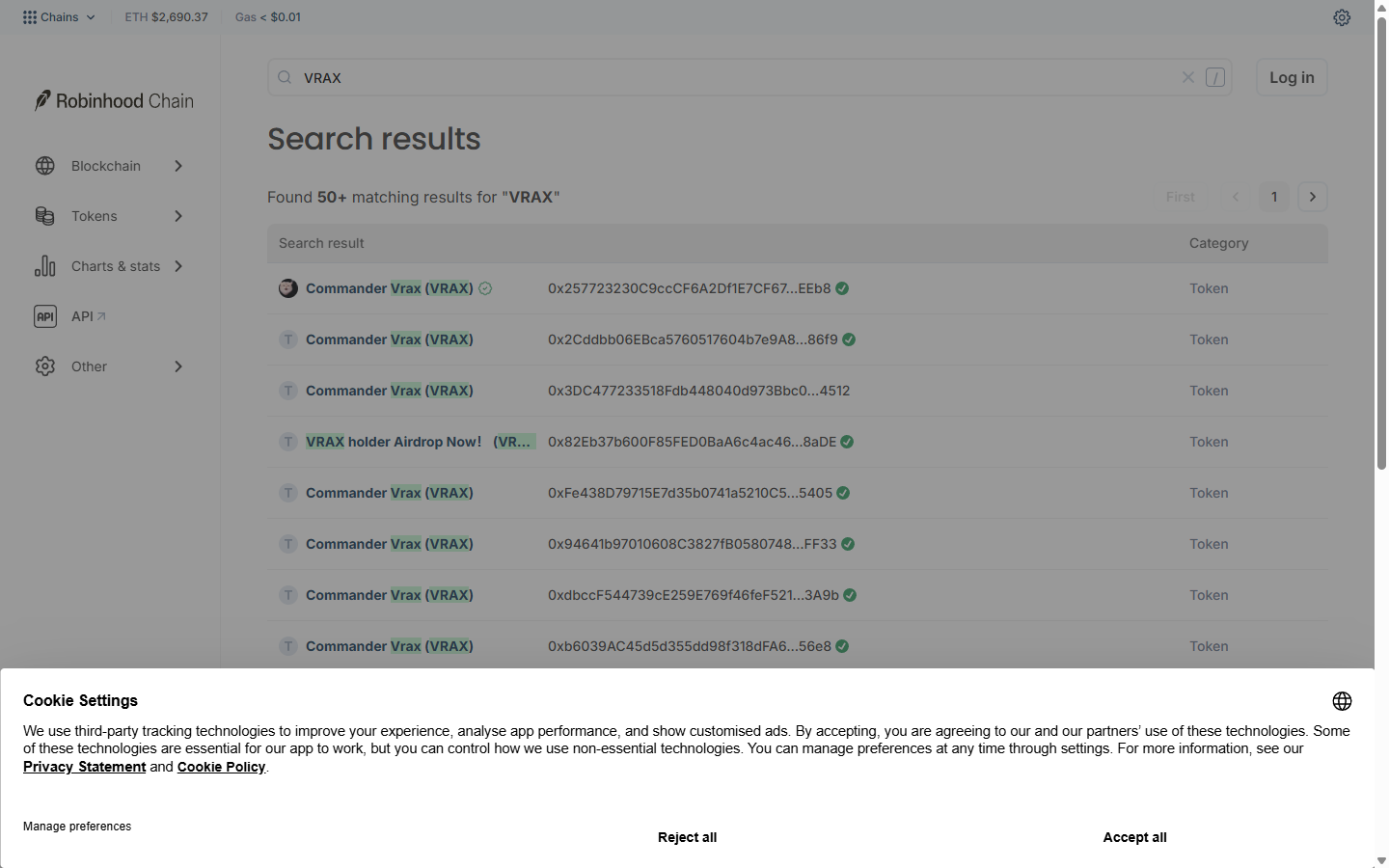
Search results for VRAX on the Robinhood Chain explorer listing several tokens with the same name, 1 October 2026
Warning: a name search can return dozens of matches. The VRAX search showed "Found 50+ matching results", and green check marks sat next to most of the addresses, so the mark alone did not tell the real token from a copy.
Step 3: Pick the right contract
1. Count the lookalikes
Search "VRAX" and the first rows alone show seven tokens called Commander Vrax (VRAX) and one called VRAX holder Airdrop Now, each at a different address. Five of them start 0x2577, 0x2Cdd, 0x3DC4, 0x82Eb and 0xFe43.
2. Get the address from a source you trust
Use the project's own link. Banana Gun Pro's Trending page shows a shortened contract, which is enough to spot a mismatch but not to confirm a match. Robinhood's contracts page says a token with a matching name or ticker but a different contract address is not a Robinhood Stock Token, so cross-check addresses against official channels.
Example: on 1 October 2026, Banana Gun Pro's Robinhood Trending page listed COMMANDER VRAX at a $4.1M market cap with a short contract of 0x33...1e44. That address matched none of the addresses in the search results.
3. Compare the full address
Compare the full address from the project's link against the token page you opened, character by character. Open the token only from the matching address. If nothing matches, do not buy until you find where the mismatch comes from.
Step 4: Read the token page
1. Check the header
The page shows the token name, an ERC-20 tag and the contract address.
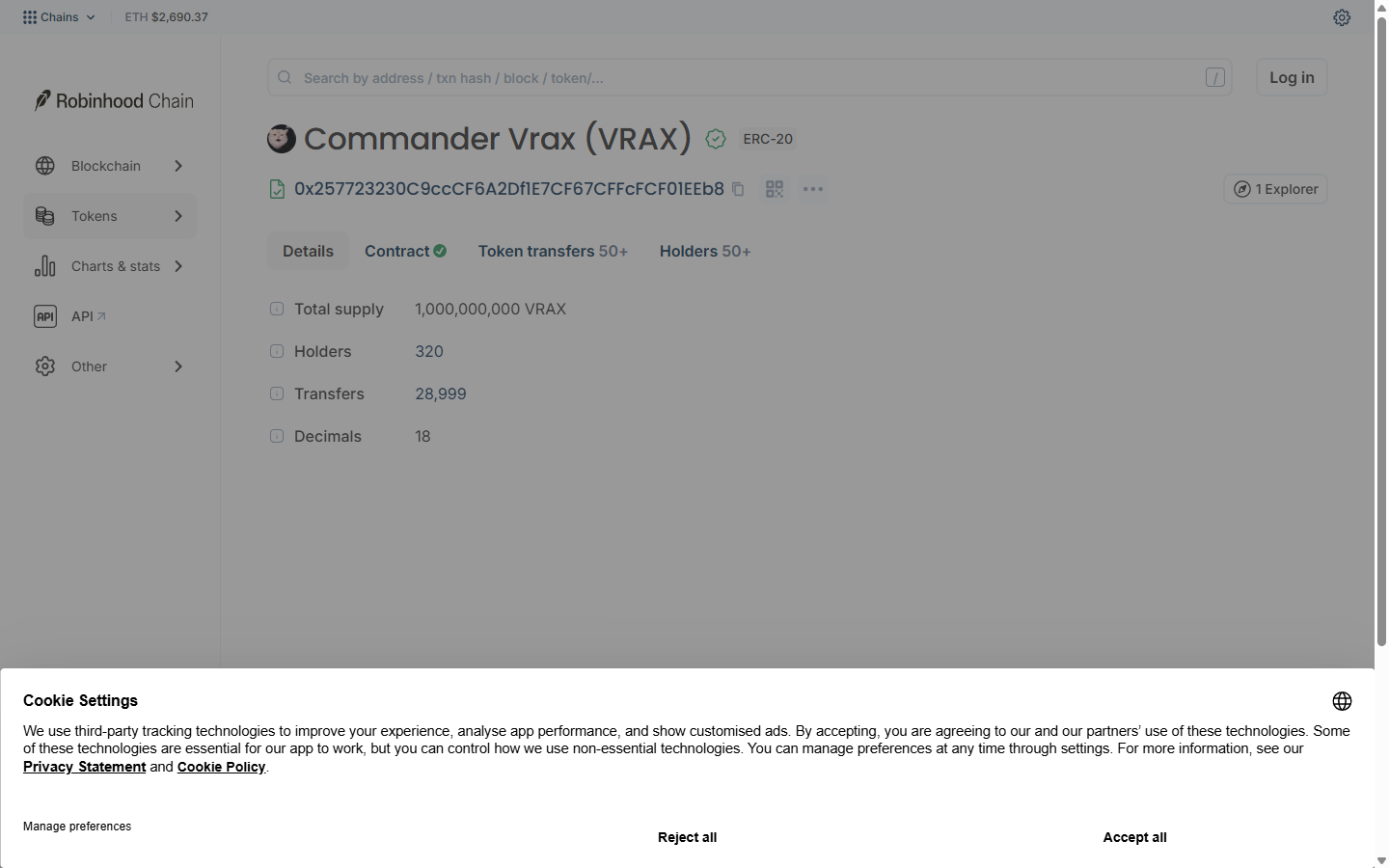
Commander Vrax token page on the Robinhood Chain explorer with Total supply, Holders, Transfers and Decimals fields, 1 October 2026
2. Open the tabs
Four tabs sit under the address: Details, Contract, Token transfers and Holders.
3. Read the fields
For Commander Vrax at 0x257723230C9ccCF6A2Df1E7CF67CFFcFCF01EEb8 the page listed Total supply 1,000,000,000, Holders 320, Transfers 28,999 and Decimals 18.
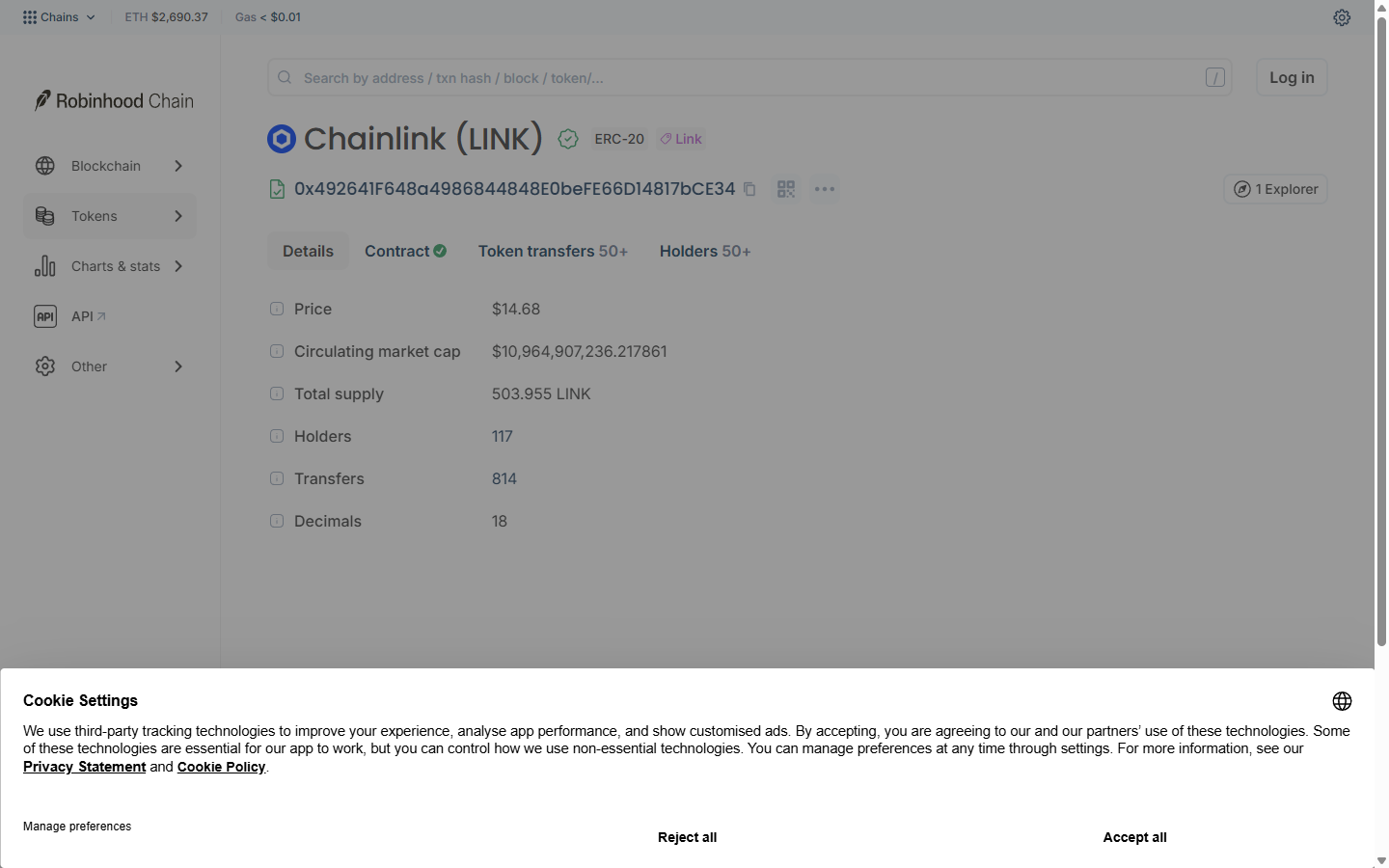
Chainlink LINK token page on the Robinhood Chain explorer showing Price, Circulating market cap, Total supply, Holders and Transfers, 1 October 2026
Example: the LINK page at 0x492641F648a4986844848E0beFE66D14817bCE34 also showed Price and Circulating market cap. The VRAX page did not, so for market data use Banana Gun Pro instead.
Step 5: Read the Holders tab
1. Open Holders
The tab lists each holder with a Quantity and a Percentage column.
2. Find the liquidity pool
Pool contracts show as named entries. On the VRAX page the top holder was UniswapV3Pool at 27.81%. That is the liquidity pool.
3. Look at the wallets below it
The next wallets held 0.98%, 0.94%, 0.89% and 0.88%.
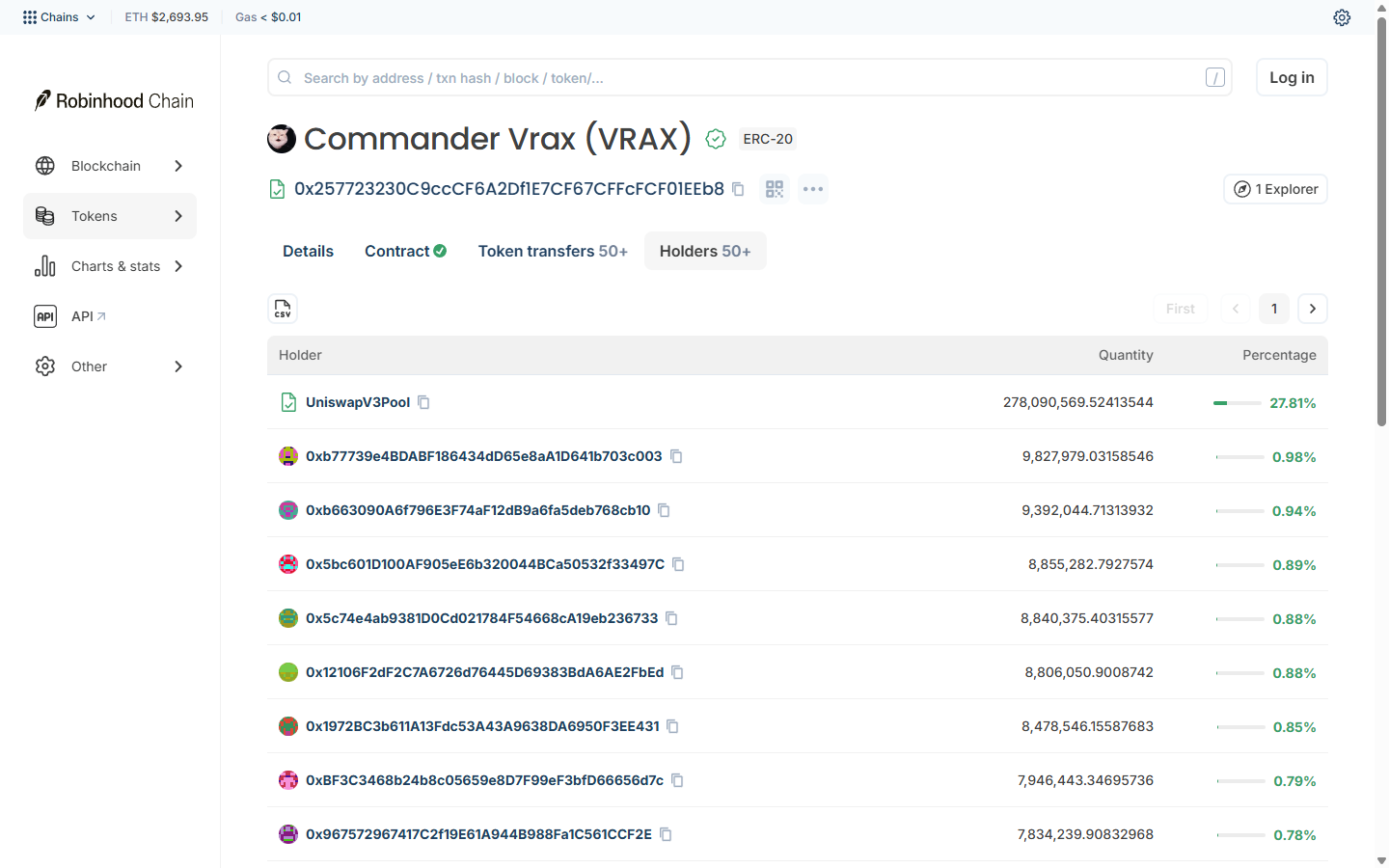
Holders tab for Commander Vrax listing UniswapV3Pool at 27.81% and wallets between 0.88% and 0.98%, 1 October 2026
Warning: a few wallets holding most of the supply can sell into every buyer. A spread like the one above is not a guarantee of anything, since one person can control many wallets.
Step 6: Check a wallet address
1. Paste the wallet address
Use the same search bar. Blockscout's address page documentation lists these tabs: Details, Transactions, Token transfers, Tokens, Internal txns and Coin balance history. Labels on Robinhood Chain may differ slightly.
2. Read the history before you copy it
Look at what the wallet bought and sold, and how long it held each position.
Step 7: Check a transaction
1. Paste the transaction hash
Search it in the same box. The home page's Latest transactions list also shows each row's type, from and to addresses, value and fee in ETH.
2. Compare the addresses
Confirm the receiving address is yours and the contract is the token you meant to buy. A transfer sent to the wrong address cannot be reversed.
Step 8: Take the checked address to Banana Gun
1. Open the bot
Open t.me/BananaGun_bot. Menu names can shift between bot updates, so if a label reads slightly differently, look for the closest match in the same menu.
2. Paste the contract
Paste the address you matched in Step 3 and review the buy menu before you confirm.
A pre-trade sell check blocks tokens you cannot sell before the buy. It does not tell you whether a contract is the real one.
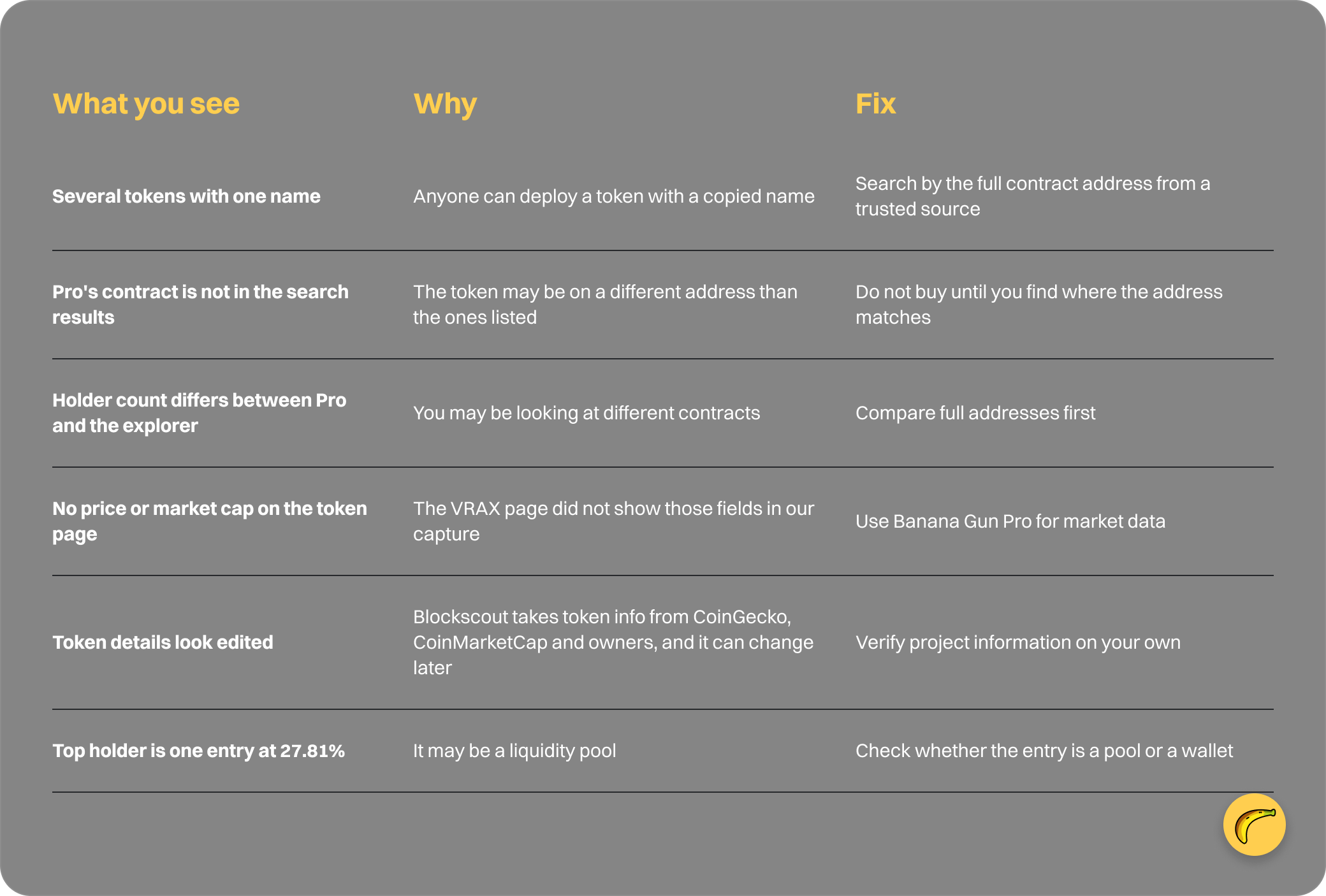
Why it didn't work
Quick recap
- Open robinhoodchain.blockscout.com.
- Paste the full address into the search bar.
- Pick the contract that matches your trusted source.
- Read the token page fields and tabs.
- Check the Holders tab for pools and large wallets.
- Look up a wallet's history before copying it.
- Check a transaction's addresses.
- Paste the checked contract into Banana Gun.
Frequently asked questions
What is the Robinhood Chain explorer?
It is robinhoodchain.blockscout.com, a Blockscout site listed in Robinhood's docs as the chain's block explorer. It covers blocks, transactions, addresses and tokens.
How do I find a token's contract address on Robinhood Chain?
Search the explorer by name, symbol or address. Because names repeat, take the address from the project's official channel or Banana Gun Pro, then match it. Blockscout's token info page adds that metadata can change later, so verify it independently.
Is there a testnet explorer?
Yes. Robinhood's docs list explorer.testnet.chain.robinhood.com for the testnet, chain ID 46630. It is for test tokens only.
Does the explorer tell me if a token is a scam?
No. It shows holders, transfers and contract data. In the VRAX search, green check marks sat beside copycat addresses too. Use it with a sell check and the habits in our guide to reading a token contract.
What is View on Robinscan?
It is the label on the explorer link in the bot's bridge flow. Robinhood's docs name Blockscout as the block explorer.
Paste your checked contract into Banana Gun at t.me/BananaGun_bot, and find new tokens through token discovery tools for Robinhood or by copy trading on Robinhood Chain.