
Robinhood Chain opened to trading bots on July 1, 2026, and Banana Gun turned on support the same day, no waitlist, no separate setup.
To copy trade on Robinhood Chain with Banana Gun, add a target wallet inside the Telegram bot, pick a copy mode, set your sizing and exit rules, then let the bot mirror that wallet's buys automatically. The mechanics match every other chain Banana Gun supports. What is different is the wallet pool itself.
Why Wallet Selection Carries Nearly All the Risk
Robinhood Chain passed $9 billion in cumulative DEX volume within four weeks of its July 1 launch. Daily volume climbed from roughly $10 million to $800 million in the first two weeks alone. That is fast growth, not a mature market.
Every wallet trading there right now is new to that chain, whatever experience it brings from elsewhere. There is no multi-cycle track record to check and no drawdown history to study yet. Some of these traders carry years of experience from Ethereum or Solana. The chain itself has no way to tell you which ones do.
Robinhood Chain support inside Banana Gun gives you the infrastructure from day one. It cannot manufacture a track record that does not exist.
How to Judge a Wallet With No History
A few checks still hold up on a short tape.
- Trade count over profit. Three lucky trades tell you nothing, thirty tell you something.
- Position sizing consistency. Wild swings between small and large trades often mean a wallet still finding its footing.
- Behavior during any drawdown you can find. A wallet that has never sold at a loss has not been tested yet.
- Activity on other chains, where the same trader may already have a longer record.
For the mechanics of pulling a wallet's record before you commit to copying it, see the guide on how to track a wallet on chain.
Setting Up Copy Trade and Sizing Your Entries
Add the wallet address inside the Telegram bot, then choose from three copy modes: Simple, Advanced and Advanced Presets. Confirm the exact options inside the bot itself, since menus change faster than any article can track.
If you're new to wallet mirroring, Copy trading covers the underlying mechanics: your bot detects a transaction from the target wallet and submits a matching trade from yours.
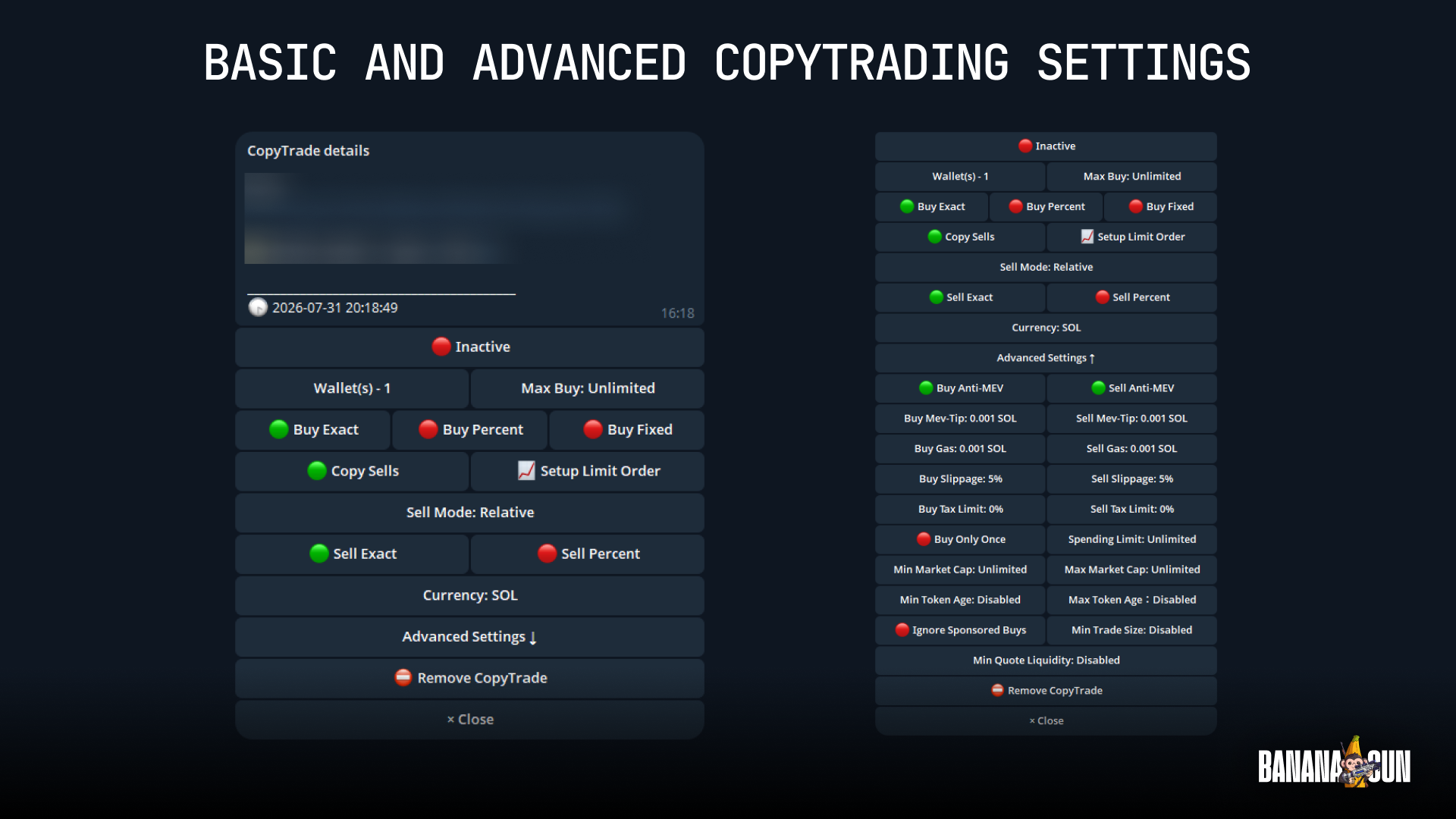
Buy Fixed sets one fixed amount for every trade you copy, so a large position from the target wallet does not become an oversized one in yours.
Buy Only Once blocks repeat entries from the same wallet for seven days.
Min and Max Market Cap filters stop the bot from copying into tokens outside a range you set, useful on a chain still filling out its token roster.
On a four-week-old chain, these filters are the main guardrail against a wallet's bad day.
Exits, and Where Banana Pro Stands
Trailing Stop Loss follows a position upward and locks in an exit once price pulls back by a set amount. Limit orders let you fix a target exit price in advance, useful when you have not fully vetted the wallet you are copying.
Banana Pro, the web terminal covering Ethereum, Solana, Base and BNB Chain, does not support Robinhood Chain. Copy trading there runs through the Telegram bot only. Banana Gun is not the only bot on Robinhood Chain either. Maestro is live there, and TradeWiz, Bloom and Sigma have all been covered trading it.
Start small if you copy a wallet on Robinhood Chain now. Cap exposure with Buy Fixed, tighten the market cap filters, and set a trailing stop before you look away. Open Banana Gun in Telegram, pick a candidate wallet, and lock in sizing and exits before you turn the copy on. That order matters more on a chain four weeks old than on one with years of history behind every wallet.