


The Polymarket leaderboard is a ranked list of the platform's top traders, sorted by profit and loss or by trading volume, with wallet addresses attached to each rank. You can find and follow those traders by opening the leaderboard, checking their P/L history, and copying their wallet address into a tracker or a copy trading tool.
This guide walks through where the leaderboard lives, what each column actually means, and how to act on it in seconds instead of just reading it.
What Is the Polymarket Leaderboard?
Every trade on Polymarket happens on-chain, so every wallet's history is public. The leaderboard takes that raw data and ranks accounts by realized profit, unrealized profit, or total volume traded. It exists because prediction markets reward information, not luck alone. A trader who consistently ranks near the top across politics, sports, and crypto markets is usually reading something the crowd is missing.
Think of it as a scoreboard for conviction. The names near the top are the ones putting real money behind their calls, market after market.

How to Find the Polymarket Leaderboard
You can find it directly on Polymarket's site, usually filtered by timeframe and by profit or volume. The problem is that the native view gives you a name and a number, not a fast path to act on either. You cannot one-click follow a wallet from Polymarket's own leaderboard, and you cannot mirror a trader's next position without manually copying an address and watching it yourself.
That gap is exactly what a best prediction market app comparison usually comes down to: who shows you the ranking, and who lets you do something with it.
The Limitation With Reading a Leaderboard and Nothing Else
A ranking is a snapshot. It tells you who has won, not what they are doing right now or how to act on their next move without lag.
By the time you spot a name near the top, copy the wallet address, paste it into a separate tracker, and manually place your own trade, the odds on that market have often already shifted.
This is the point where most traders stop at "interesting list" instead of turning it into an actual position.

Same Markets, Faster Terminal: Banana Predict's Leaderboard
Banana Predict is currently in beta at predict.bananagun.io (as of July 2026), and it is not a separate or rival prediction market.
It trades the same markets and the same liquidity as Polymarket, mirroring the same real order books across categories like politics, sports, crypto, finance, and elections. Nothing about the underlying odds changes. You are still betting against the same pool of money. What changes is the terminal sitting on top of it.
Its own leaderboard ranks traders by the same two signals, profit/loss and volume, but adds two things Polymarket's native view skips.
Each rank carries a trader avatar, so you recognize a wallet by face across sessions instead of memorizing a string of characters.
Each rank also carries a copyable wallet address sitting right next to the P/L and volume numbers. There is no separate export step and no second tab to open.
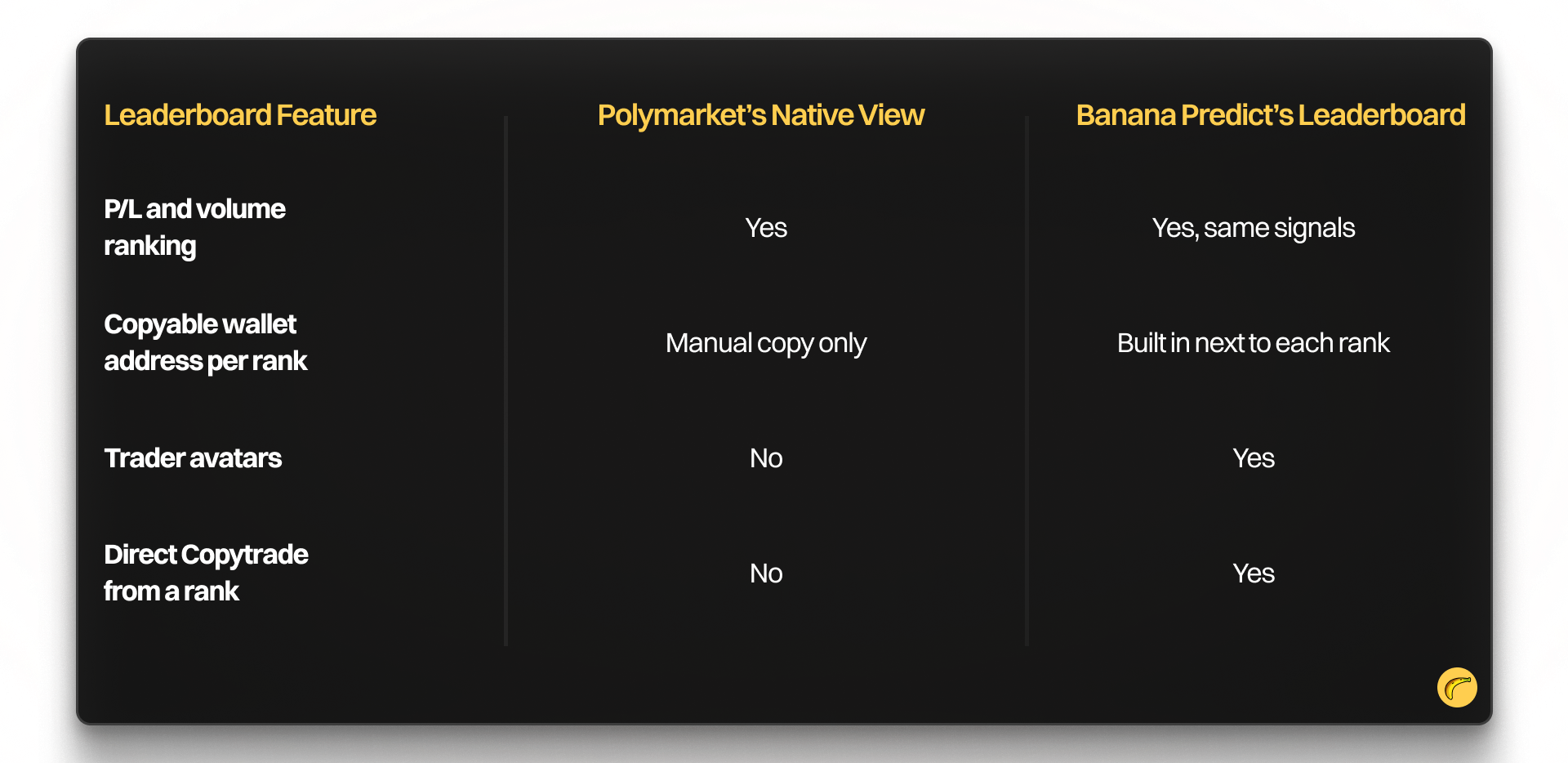
Copytrade: Turning a Rank Into a Position
Once you find a wallet worth following on the leaderboard, Copytrade lets you mirror that trader's positions directly, without switching platforms or losing the market you were already watching.
You can read more about the mechanics in our guide on how to copy trade on Banana Predict.
Wallet Tracker and Social/X Tracker
If you want to watch a wallet before committing to copy it, the Wallet Tracker follows its on-chain activity in real time.
The Social/X Tracker lets you search by contract address, symbol, or username to see what's moving on X right now.
That matters because a market's next swing often starts on social feeds before it shows up in the order book.
How to Follow a Top Trader on Banana Predict
The path from "who is winning" to "I have a position" is short.
- Open the Leaderboard and sort by P/L or Volume, depending on whether you care about proven edge or sheer activity.
- Check the trader's history across categories. A wallet that only wins in one narrow market is a different signal than one that wins across politics and sports both.
- Copy the wallet address or use Copytrade directly from their leaderboard profile to mirror their next move on the exact same market and odds.
- Connect a wallet if you have not already. Banana Predict requires a connected wallet to trade, since positions settle on-chain just like on Polymarket.

Everything you are trading here still sits on the same liquidity you would find natively on Polymarket. You have not switched markets. You have switched how fast you can act on what the leaderboard is telling you.
Why the "Different Platform" Objection Doesn't Hold Up
The most common hesitation is assuming a switch means starting over on a separate exchange with separate odds. That is not what is happening here.
Banana Predict mirrors Polymarket's liquidity. The prices, the probabilities, and the markets are the same ones you would see going directly to Polymarket. As stated on Banana Predict, the goal is trading Polymarket with Banana speed: a faster way to execute on the same prediction markets while tracking smart money and copying top traders.
That framing matters because it tells you what you give up by using a faster terminal: nothing. Same odds, same settlement, same on-chain history. What you gain is the leaderboard, Copytrade, and wallet tracking sitting on the same screen as the trade itself, instead of split across a block explorer, a spreadsheet, and a separate exchange tab.
If you are already comfortable navigating prediction markets, there is no migration cost here. You are looking at the same board, just with more tools built into the view.
A leaderboard is only useful if you can act on it before the odds move. Open the Leaderboard on Banana Predict, find a wallet with a P/L history you trust, and copy their next position on the same market you were already watching.