
Copy trading on Solana means the bot buys what a chosen wallet buys, within the limits you set. You need a Banana Gun wallet funded with at least 0.1 SOL and the address of a wallet worth following.
The answer in one line: fund the wallet, paste the target address into New Copy Trade, set a buy size, add guardrails, then decide how exits work before you switch it on.
Banana Gun's copy trading lives in the Telegram bot. For the concept first, our copy trading explainer covers how wallet mirroring works.
Step 1: Set up and fund your wallet
1. Open the bot and create a wallet
Open t.me/BananaGun_bot and tap Start. Go to Wallet Setup, tap Create Wallet and name it. Banana Gun shows the private key once and cannot show it again, so save it offline now.
Menu names can shift between bot updates, so if a label reads slightly differently, look for the closest match in the same menu.
Already have a wallet in Phantom or Solflare? Tap Import Wallet and paste its private key instead.
Warning: a lost private key means a lost wallet.
2. Send SOL to it
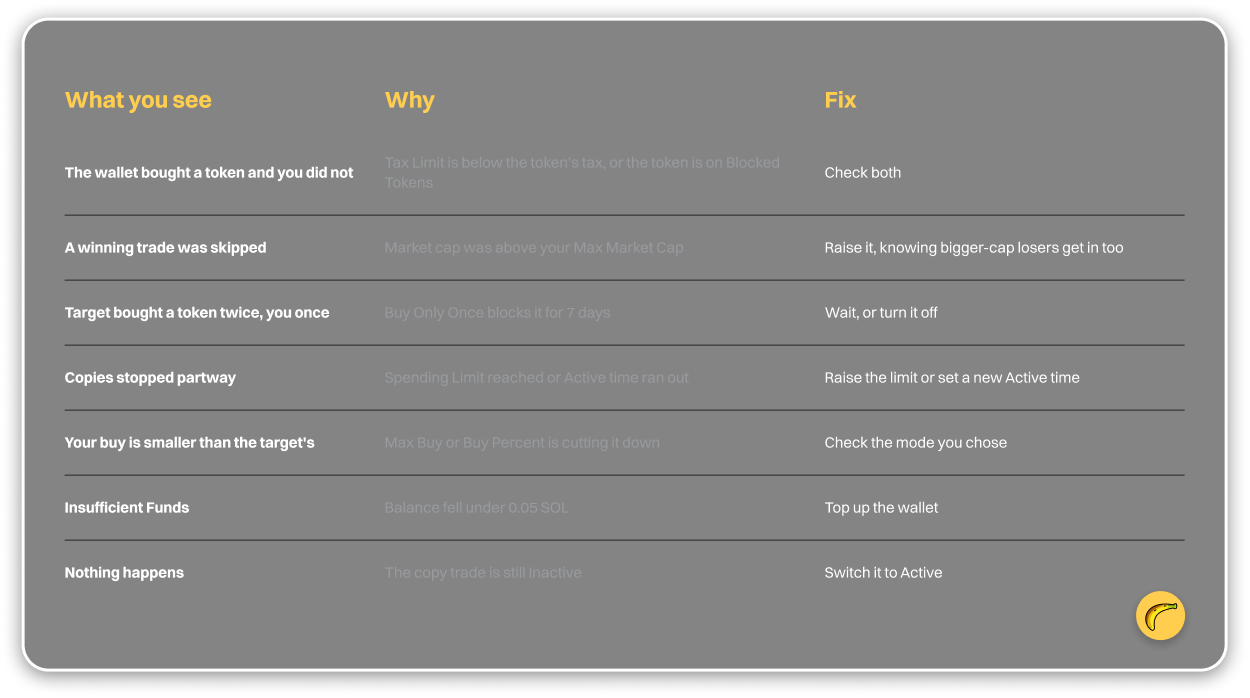
Send /wallets to see the public key of your new wallet, then send SOL to it from Phantom or an exchange. Fund at least 0.1 SOL and keep 0.05 SOL or more in the wallet, because below that buys fail with Insufficient Funds.
Step 2: Find a wallet to copy
1. Check a leaderboard
Fomo Wallet Finder lists a TRENDING set of Fomo traders with followers, trades, PnL and volume. Read trades next to PnL, because a big profit on a handful of trades tells you little.
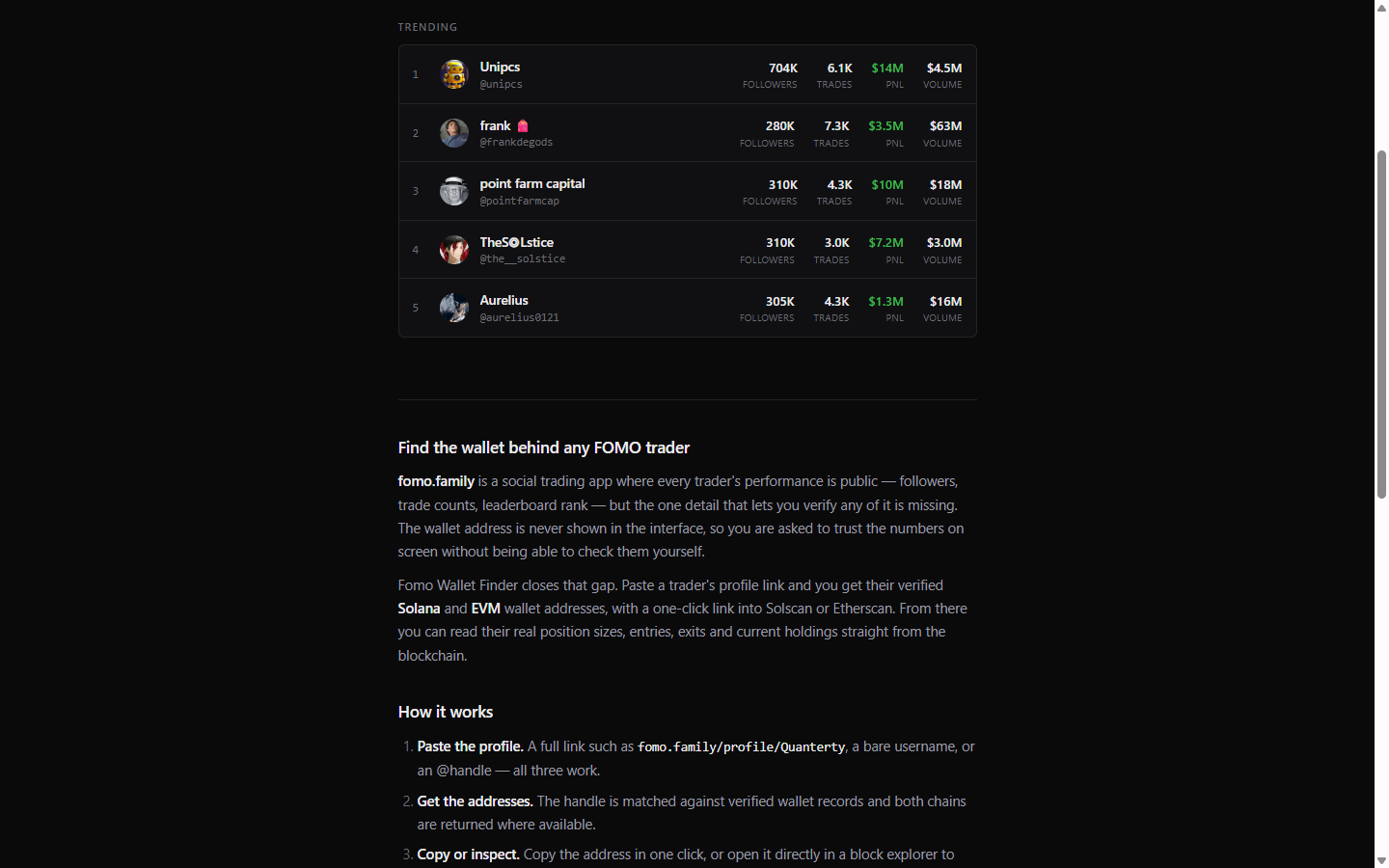
Fomo Wallet Finder TRENDING list with followers, trades, PnL and volume for five traders, 1 October 2026
Solana Tracker is another option. Its FOMO leaderboard has 1D, 7D, 14D, 30D and 90D tabs and columns for Realized, Volume, ROI, Win Rate, Trades and Tokens. On 1 October 2026 every tab showed "No data yet", so it did not help that day. The next mini-step does not depend on it.
2. Turn a Fomo username into a wallet address
Fomo shows followers, trades and PnL but not the wallet address. Fomo Wallet Finder fills that gap: paste a fomo.family profile link, username or @handle and it returns verified Solana and EVM addresses with GMGN, Nansen and Cielo links. It is free, with no signup or wallet connection, and allows 2 new lookups a day.
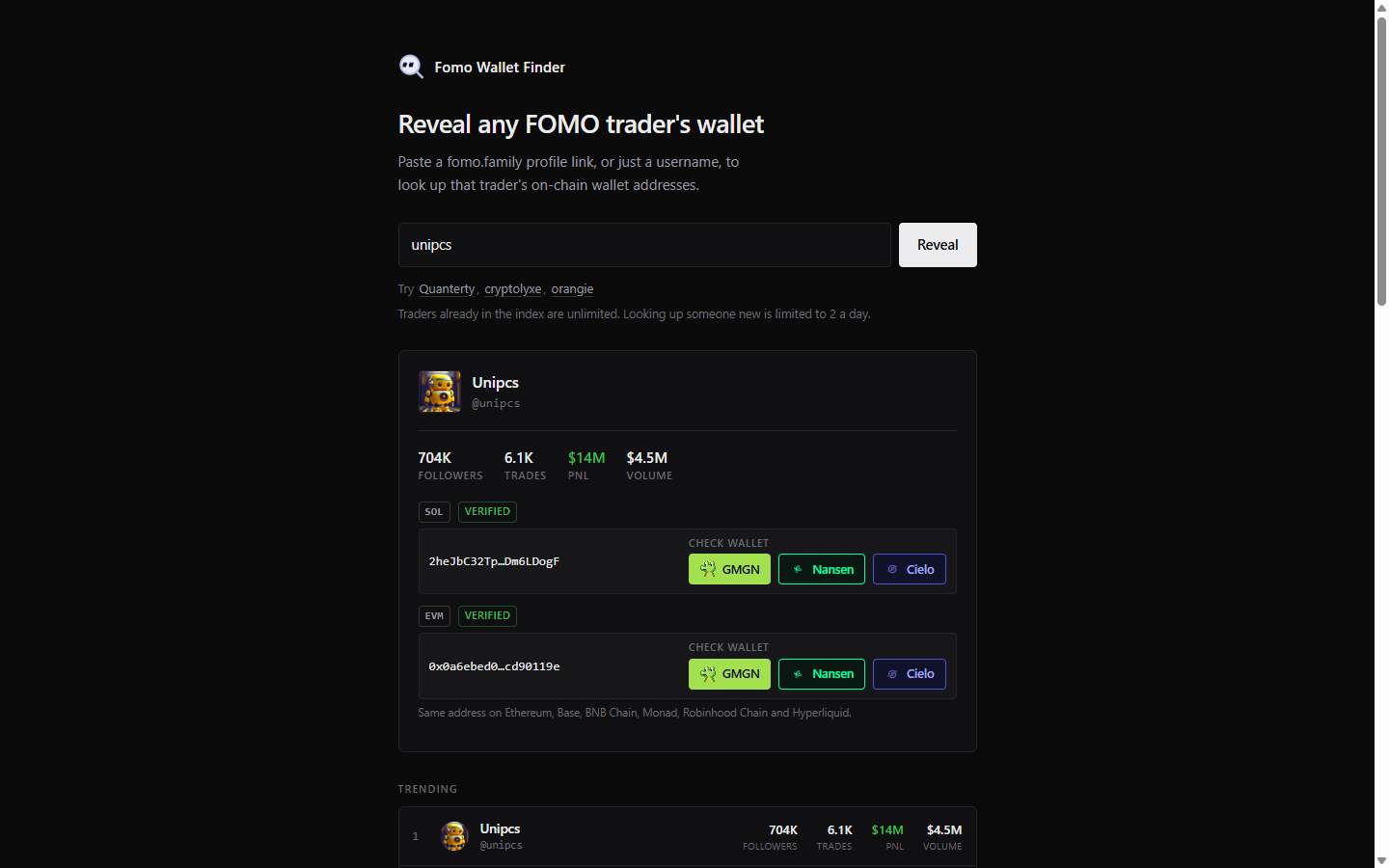
Fomo Wallet Finder result for Unipcs with verified Solana and EVM addresses plus GMGN, Nansen and Cielo links, captured 1 October 2026
Example: on 30 September 2026 the finder listed Unipcs (@unipcs) with $14M all-time PnL, 704K followers and the Solana address 2heJbC32Tpfcb3nbUb5ER61K11FGZVfVGtVnDm6LDogF. That shows what a lookup returns, not a recommendation; all-time totals say nothing about what a copier would have earned.
3. Read the wallet's recent trades
Open the GMGN, Nansen or Cielo link next to the address and scroll through the last few days. Banana Gun's docs warn that some target wallets buy pump-and-dumps or honeypots and use copiers as exit liquidity. Reading here costs less than one bad copy.
Step 3: Create the copy trade
1. Open the copy trade menu
Tap Copy Trading in the start menu, or send /copytrade, then tap New Copy Trade.
2. Paste the target wallet
Paste the Solana address from Step 2, then type a description you will recognize later, such as the trader's handle.
3. Select your wallets and leave it off
Pick which of your Banana Gun wallets pays for the copies. The copy trade starts as Inactive. Leave it there until Steps 4 to 6 are done, so nothing fires before your limits exist.
Step 4: Decide how much to buy
1. Pick a buy-size mode
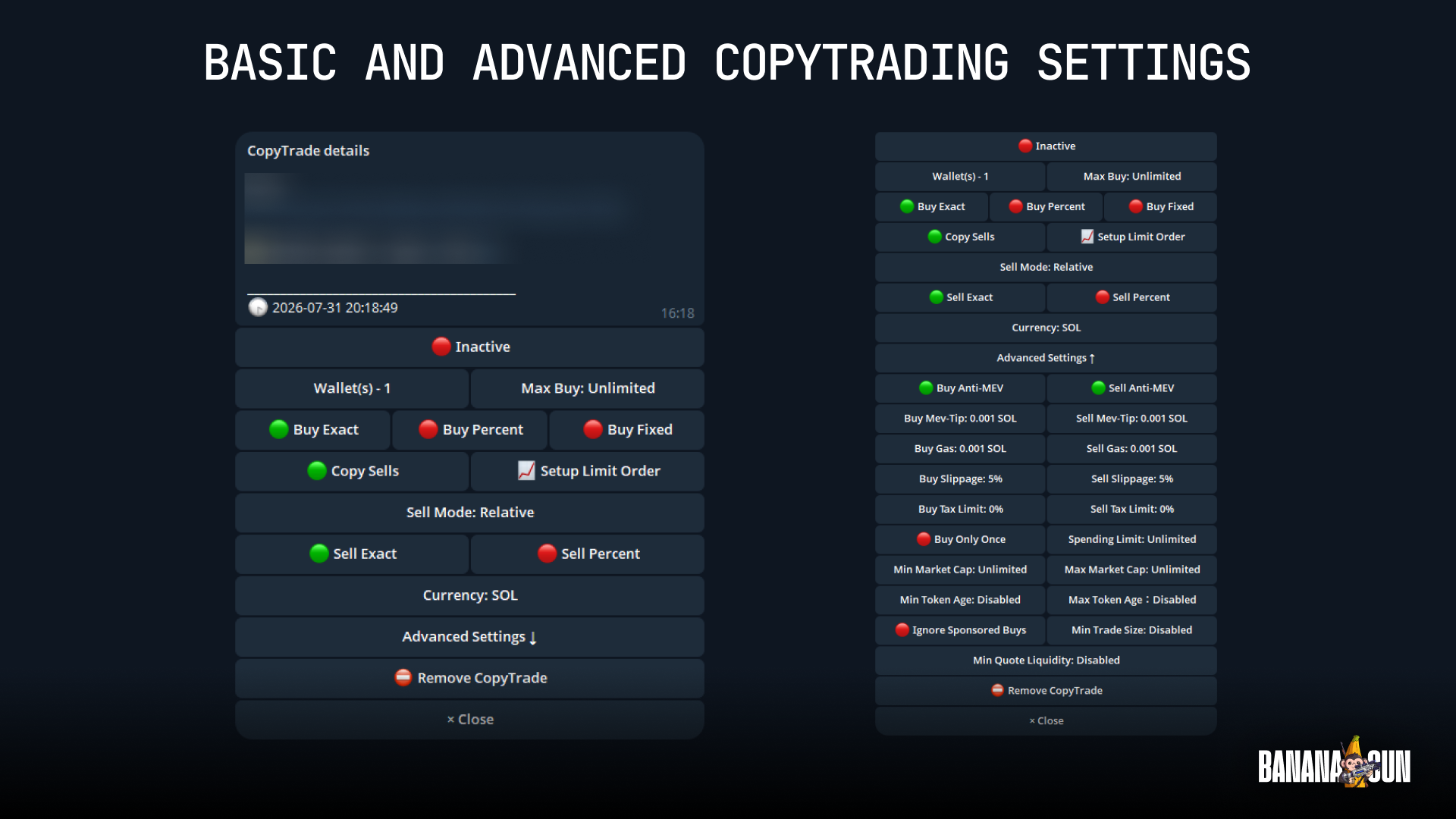
The Solana docs list Max Buy, Buy Exact, Buy Percent and Buy Fixed. Each answers one question: how much SOL do you spend when the target buys?
For a first run, Buy Fixed is easiest to reason about: your spend per trade is set upfront.
2. Count the fee
Banana Gun's docs list a 1% fee on Solana. On a 1 SOL copied buy that is 0.01 SOL before slippage and tips, and a sell charges the same percentage again.
Step 5: Add guardrails
1. Open Advanced Settings
Tap Advanced Settings for buy and sell anti-MEV, MEV tip, gas and slippage. Anti-MEV is on by default. The slippage you allow is price you may pay, so keep it as low as the token lets you.
2. Set the limits that skip bad trades
Tax Limit stops a copy when the token's tax is above your number: with a 10% limit, a 15% tax token fails. Buy Only Once blocks a token for 7 days after your first buy. Spending Limit sets a total per wallet. Min Market Cap and Max Market Cap skip trades outside your range. Tokens you already know are bad go on the Blocked Tokens list.
Example: with Max Market Cap at $500K, a buy the target makes at $600K does not copy. The cap also skips the target's larger-cap winners, so a low ceiling costs you good trades along with bad ones.
Step 6: Set exits and switch it on
1. Decide whether sells are copied
Copy Sells is an on/off switch. With it on, you mirror sells using Sell Exact or Sell Percentage. Example: with Sell Percentage at 50%, a target that sells 20% of its position makes you sell 10% of yours.
2. Attach your own exit
Tap Setup Limit Order to give copied positions their own take profit or stop loss. Your fill comes after the target's, so their exit price may not suit your entry. A +100% take profit is 2x and +300% is 4x.
Warning: a take profit that price never reaches never sells, and a stop loss only helps if you set one.
3. Turn it on and watch the first fills
Switch the copy trade from Inactive to Active and set the Active time you want. Copied buys appear in /positions. To change anything later, send /copytrade and tap Edit. For Robinhood Chain, see the Robinhood Chain copy trade guide; to follow a wallet without copying it, read about wallet tracking.
Why it didn't work
Quick recap
- Create or import a wallet and fund it with at least 0.1 SOL.
- Pick a wallet from a leaderboard or Fomo Wallet Finder and read its recent trades.
- Start a New Copy Trade, paste the address, leave it Inactive.
- Choose a buy-size mode and count the 1% fee.
- Set Tax Limit, Buy Only Once, Spending Limit and market cap limits.
- Decide on Copy Sells, add a limit order, then switch to Active.
Frequently asked questions
How much SOL do I need to copy trade on Solana?
Banana Gun's Solana docs say to fund at least 0.1 SOL and keep at least 0.05 SOL to avoid Insufficient Funds errors. Copy sizes come out of that balance.
Does a copy trade buy at the same price as the wallet I follow?
No. A copy trade fills after the copied wallet's trade, so on a fast move your price is worse. More copiers on one wallet push your fill further back.
Can I copy only the buys and sell on my own?
Yes. Turn Copy Sells off and attach a take profit or stop loss with Setup Limit Order. A trigger that is never reached never sells.
How do I find the wallet address of a Fomo trader?
Paste the fomo.family profile link, username or @handle into Fomo Wallet Finder. It returns verified Solana and EVM addresses.
Start your first copy trade in the Banana Gun Telegram bot.