

Pick Banana Gun if you trade on Ethereum. Manual buys and limit orders there cost 0.5%, against Maestro's 1% on every buy and sell, and Banana Gun also documents DCA, a Security PIN, monthly free-trade credits and a web terminal.
Off Ethereum the fees match at 1%, and both bots share the same cashback tiers, copy trading, limit orders and take profit / stop loss. Everything below is sourced from each side's own docs.
Maestro facts in this post are as of October 2026 and come from Maestro's public documentation. We read the docs, not the live bot, so check the bot itself before you move funds.
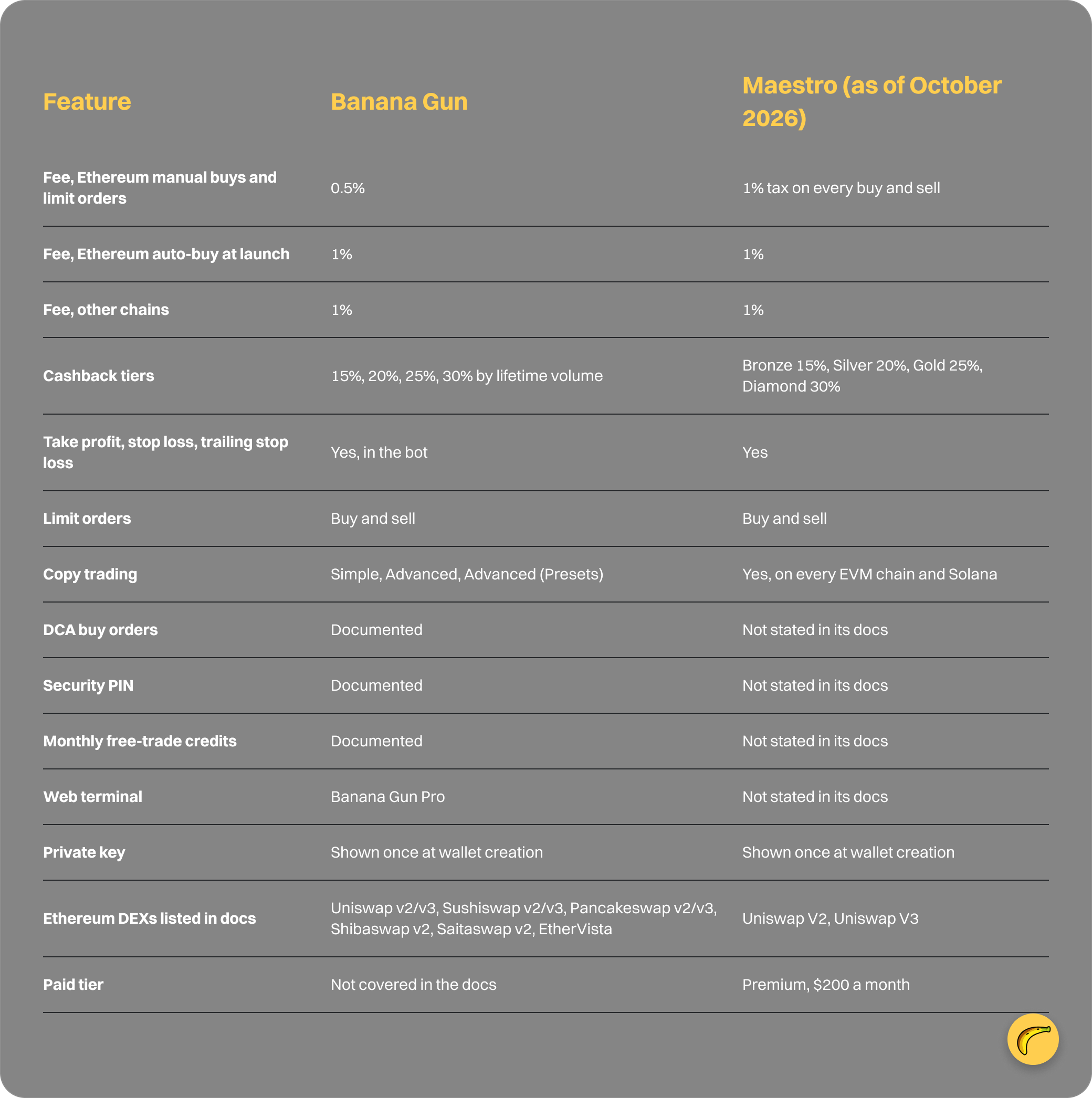
Banana Gun vs Maestro: feature and fee table
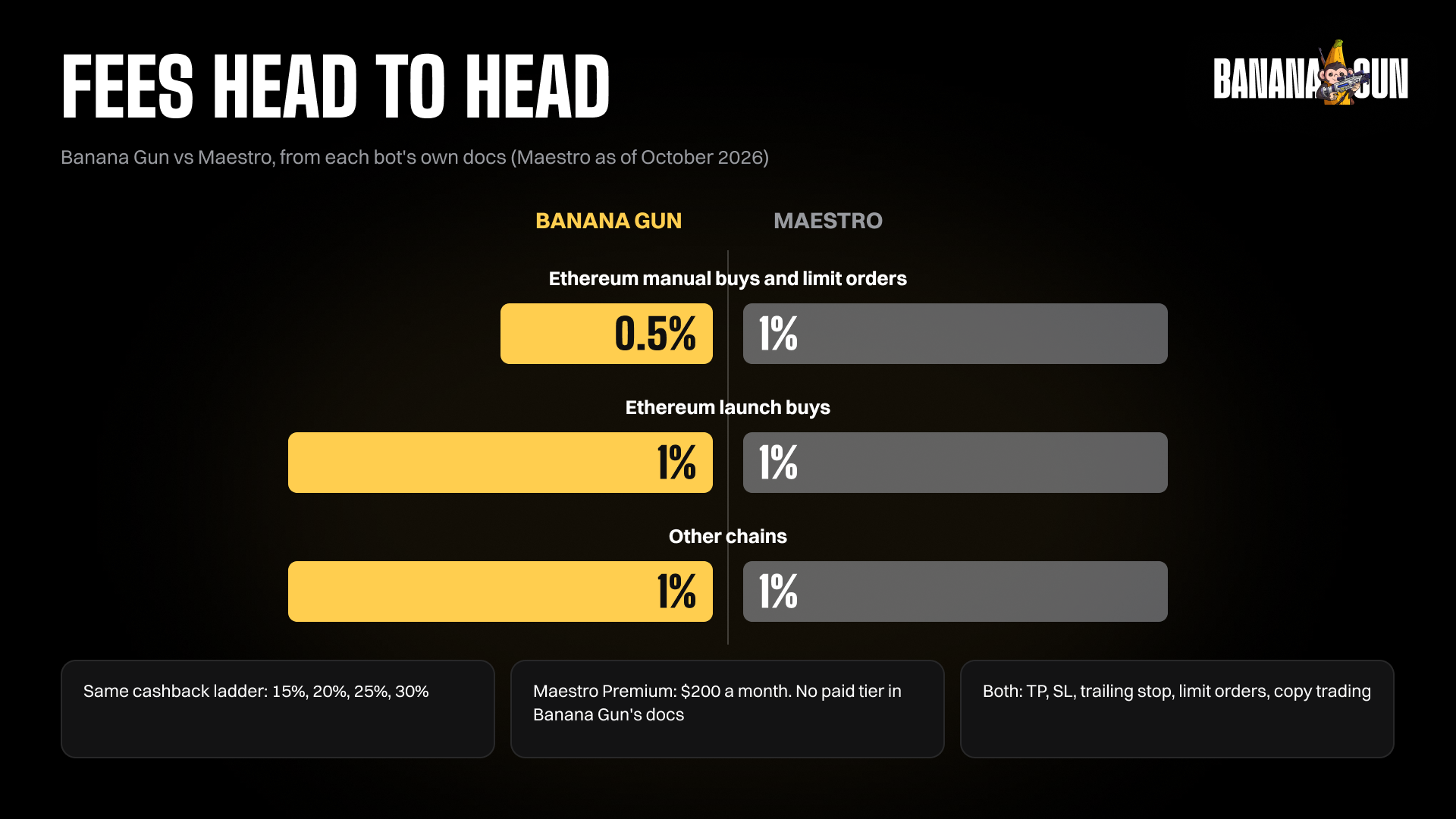
Which bot costs less to trade with?
On Ethereum manual buys and limit orders, Banana Gun does. The Banana Gun fee docs list 0.5% for those two order types, while Maestro's fee page describes a 1% tax on every buy and sell. Simple transfers are not taxed on Maestro.
Take a $5,000 manual buy on Ethereum. At 0.5% the fee is $25, at 1% it is $50. Trade that size a few times a week and the gap adds up quickly.
The scope matters. The 0.5% rate covers manual buys and limit orders on Ethereum only. Auto-buy at launch on Ethereum and trades on other chains are 1% on Banana Gun, the same as Maestro. Our docs do not state a sell-side fee, so we make no claim there.
For the full breakdown, read our Banana Gun fees guide.
Why traders switch to Banana Gun
Here is what the docs back up, with Maestro's side stated as of October 2026.
Lower Ethereum fees on manual buys and limit orders
0.5% against 1%, as covered above. If you place manual buys on Ethereum, this is the biggest single reason on the list.
A wider Ethereum DEX list
Per each side's docs, Banana Gun lists six DEX families on Ethereum: Uniswap, Sushiswap, Pancakeswap, Shibaswap, Saitaswap and EtherVista. Maestro's docs list Uniswap V2 and V3.
If you trade tokens on the smaller venues, check this first. If you trade on Base, see our best trading bot for Base guide.
DCA buy orders
Banana Gun documents dollar-cost averaging (DCA) buy orders that purchase a token in smaller amounts at set intervals. Maestro's docs do not mention DCA.
A Security PIN
You can set a PIN in Banana Gun so the bot locks after each session, with a session length you choose. Maestro's docs do not mention a PIN.
Monthly free-trade credits
Banana Gun documents monthly credits that give 100% cashback on eligible trades. They cover simple trades between $25 and $50,000 and do not apply to limit orders, copy trades or DCA orders.
Streak bonuses are listed at 7 days +1, 14 days +3 and 30 days +6. Maestro's docs do not describe free trades.
A web terminal next to the bot
Banana Gun Pro at pro.bananagun.io gives you a browser terminal alongside the Telegram bot. Maestro's docs describe a Telegram bot, and we found no web terminal in them.
One EVM wallet address across EVM chains
Your Banana Gun EVM wallet uses the same address on each EVM chain, so you are not tracking a different address per chain.
Where the two bots are the same
Several features line up. Cashback tiers run 15% to 30% on both, based on trading volume. Both support take profit, stop loss and trailing stop loss, buy and sell limit orders, and copy trading.
Both show you your private key once, at wallet creation, and neither lets you pull it out later. Save it then. Our private key guide covers what to do.
On Solana, MEV routing through private relays exists on both sides. On BSC and Base, neither offers it.
Which one should you pick?
Pick Banana Gun if most of your volume is on Ethereum, you place manual buys or limit orders, or you want DCA, a PIN, free-trade credits and a web terminal in one place.
To see which chains Banana Gun covers today, check supported chains.
If you are still deciding between a bot and a plain DEX interface, read Telegram trading bots vs DEX interfaces.
FAQ
Is Banana Gun cheaper than Maestro?
On Ethereum manual buys and limit orders, yes: 0.5% against Maestro's 1% on every buy and sell. On other chains and for auto-buy at launch on Ethereum, both charge 1%.
Does Banana Gun have a web terminal?
Yes. Banana Gun Pro at pro.bananagun.io is a browser terminal that runs alongside the Telegram bot. As of October 2026, we found no web terminal described in Maestro's docs, though we read the docs and not the live bot.
Do both bots have copy trading and take profit / stop loss?
Yes. Both document copy trading, limit orders, and take profit, stop loss and trailing stop loss. Banana Gun copy trading comes in Simple, Advanced and Advanced (Presets) modes.
Does Maestro cost money to use?
Maestro offers a Premium subscription at $200 a month, which raises limits such as copy-trade wallets and limit orders. The Banana Gun docs do not cover subscriptions.
Can I export my private key from either bot?
No. Both show the key once, when you create the wallet. Save it at that moment.
Try Banana Gun
Open the bot on Telegram at https://t.me/BananaGun_bot, or use the web terminal at https://pro.bananagun.io. Compare your own trades at 0.5% and 1% before you decide.