
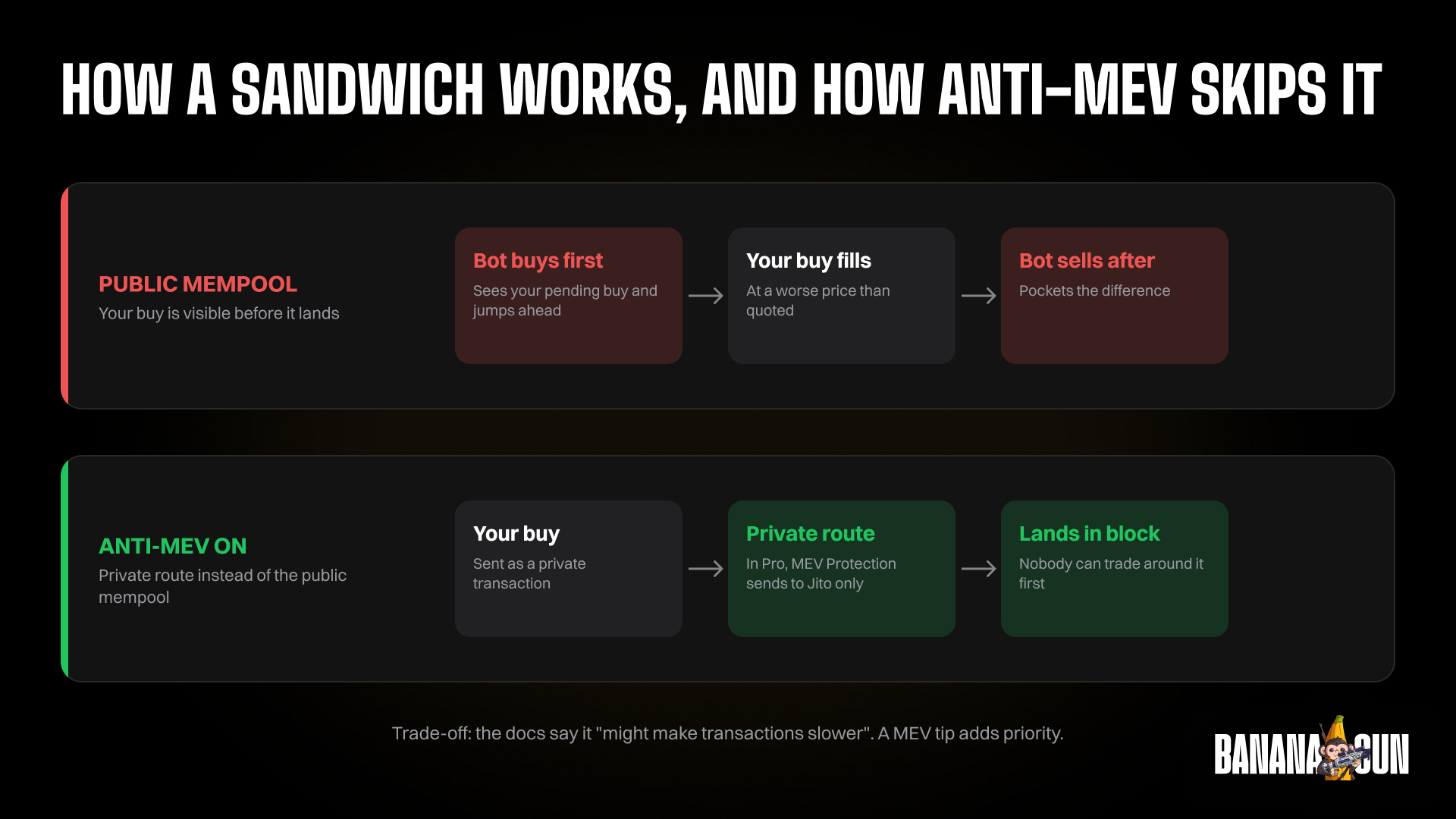
A trading bot protects you from MEV by sending your transaction privately instead of broadcasting it to the public mempool, where bots can see it and sandwich it. In Banana Gun, that comes down to settings you control: Anti-MEV in the Telegram bot, and MEV Protection versus Public in Banana Gun Pro.
Protection is not free. The docs say that turning Anti-MEV on "prevents these attacks but might make transactions slower", so the setting you pick trades speed against safety.
Background is in our posts on what MEV is, its cost and sandwich attacks. This post covers the controls only.
What does the bot do to your transaction?
When you press buy, your transaction can travel one of two ways. It can go to the public mempool, or it can go as a private transaction that other traders cannot read while it waits.
The public path is the fast, open one. The Banana Gun Pro docs describe Public as the "fastest way to send transactions to the next available validator", and say it "exposes you to MEV attacks".
The private path is what the docs call Anti-MEV in the Telegram bot: "Use private transactions instead of the public mempool."
In Banana Gun Pro, the docs name the route. With MEV Protection enabled, "transactions are sent to Jito validators, protecting you from MEV attacks."
The Pro how-to-gas page adds that a MEV Tip pays validators "to include your transaction in a private bundle", which "hides it from public view during validation".
Which MEV settings does Banana Gun have?
There are three things to learn: the protection switch, the tip, and the gas or priority fee that sits next to it. The table lists each one and where you find it.
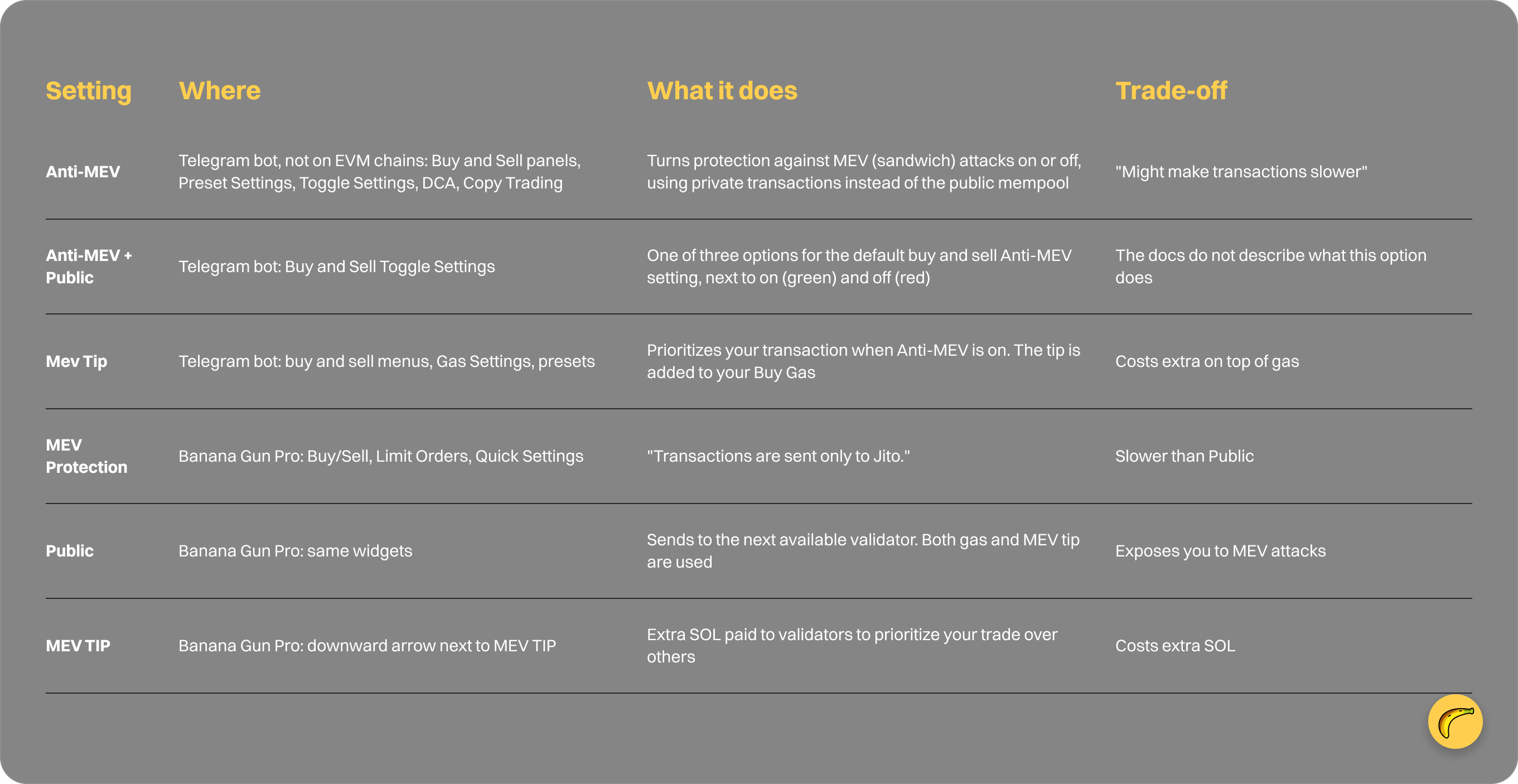
How do you turn Anti-MEV on in the Telegram bot?
Open the buy or sell menu and look for the Anti-MEV button. Green means on and red means off. You can also change it inside a preset, because the docs state that "changes made in either location will update the selected preset."
To set a default, open Toggle Settings. The Buy and Sell tabs let you "set the default buy Anti-MEV option to on (green), off (red), or Anti-MEV + Public." The docs do not say which state ships out of the box. Check your screen.
Anti-MEV also appears in Buy and Sell DCA and in Copy Trading, where you get separate Buy Anti-MEV and Sell Anti-MEV buttons.
Where is Anti-MEV not available?
On EVM chains, the Telegram bot docs say it plainly: "On EVM chains, Buy GWEI replaces Buy Gas, and the Anti-MEV button is not available."
The same applies to copy trading, where "the Buy Anti-MEV and Sell Anti-MEV buttons are not available for EVM copy trades."
So do not assume an EVM trade carries the same protection. The docs describe no other MEV protection on EVM. Slippage still applies on every chain, and our slippage guide shows where to set it.
What is a MEV Tip, and how is it different from gas?
A priority fee and a MEV Tip are not the same thing. The how-to-gas page says priority fee transactions are public, "making them visible to MEV bots and vulnerable to frontrunning or sandwich attacks."
A MEV Tip, by contrast, is "a private fee paid directly to validators (e.g., Jito) to include your transaction in a private bundle." Tips are auction-based, so "higher tips increase your transaction's priority in the private bundle."
In the Telegram bot, the Mev Tip "is added to your Buy Gas", and it applies when Anti-MEV is on. The Gas Settings menu holds four items: Buy Gas, Sell Gas, Buy Mev Tip and Sell Mev Tip.
The Solana gas settings page describes the busy-network case this way: "When the Solana network is busy, a Mev Tip lets you pay extra to speed up your transaction. Validators prioritize transactions with higher tips."
What do the Normal, Fast and Insane presets change?
Each preset carries its own gas, slippage, Anti-MEV, MEV tip and price impact settings. Picking a preset therefore moves several protection and speed levers at once.
- Normal: "Lowest gas and MEV tip. Suitable for most trades."
- Fast: "Higher gas and MEV tip for faster transaction inclusion."
- Insane: "Highest gas and MEV tip for the fastest transaction execution during highly competitive trades."
The docs do not list which preset has Anti-MEV switched on or what the default tip values are. Open the preset on your account and read it before you rely on it.
Which setting should you use when?
Use the docs' own guidance as your starting point, because the speed and protection trade-off is the whole decision.
In Banana Gun Pro, enable MEV Protection if you want protection. The FAQ says "transactions are sent to Jito validators."
For the fastest route, choose Public. The FAQ adds: "We recommend using tight slippage (5% or less) when PUBLIC is enabled."
For thin markets, the how-to-gas page says: "Use MEV Tip when trading low-liquidity or low-volume tokens, where your transaction is more vulnerable to sandwich attacks."
When you want both, the same page suggests "a 70/30 split (e.g., 0.07 Priority Fee and 0.03 MEV Tip) when you want both speed and protection."
For auto-buys at launch on Solana in the Telegram bot, the docs say to "enter the recommended or higher MEV Tip to maximize your chances of inclusion in the first block."
If a trade fails, the troubleshooting advice is to "increase MEV Tip (e.g., from 0.001 to 0.005 or higher)."
Frequently asked questions
Does Banana Gun protect every trade from MEV?
The docs do not say that. Protection depends on the setting you use: Anti-MEV in the Telegram bot, or MEV Protection instead of Public in Banana Gun Pro. On EVM chains the docs say the Anti-MEV button is not available.
Will MEV protection slow down my trade?
It can. The docs say Anti-MEV "might make transactions slower", and the Pro FAQ says Public "is faster than just enabling MEV". The docs give no latency figures.
What does Public mean in Banana Gun Pro?
Public sends your transaction to the next available validator, which the docs call the fastest route. The same FAQ says it "exposes you to MEV attacks", which is why they recommend slippage of 5% or less.
What is the difference between a MEV Tip and a priority fee?
A priority fee is public and visible to MEV bots. A MEV Tip is a private fee paid to validators, such as Jito, to include your transaction in a private bundle. You can split the two, for example 0.07 priority fee and 0.03 MEV Tip.
Try it yourself
Open the settings, read what each toggle says on your own screen, and match it to the trade you are about to make. Start in the Telegram bot at https://t.me/BananaGun_bot or in Banana Gun Pro at https://pro.bananagun.io.