

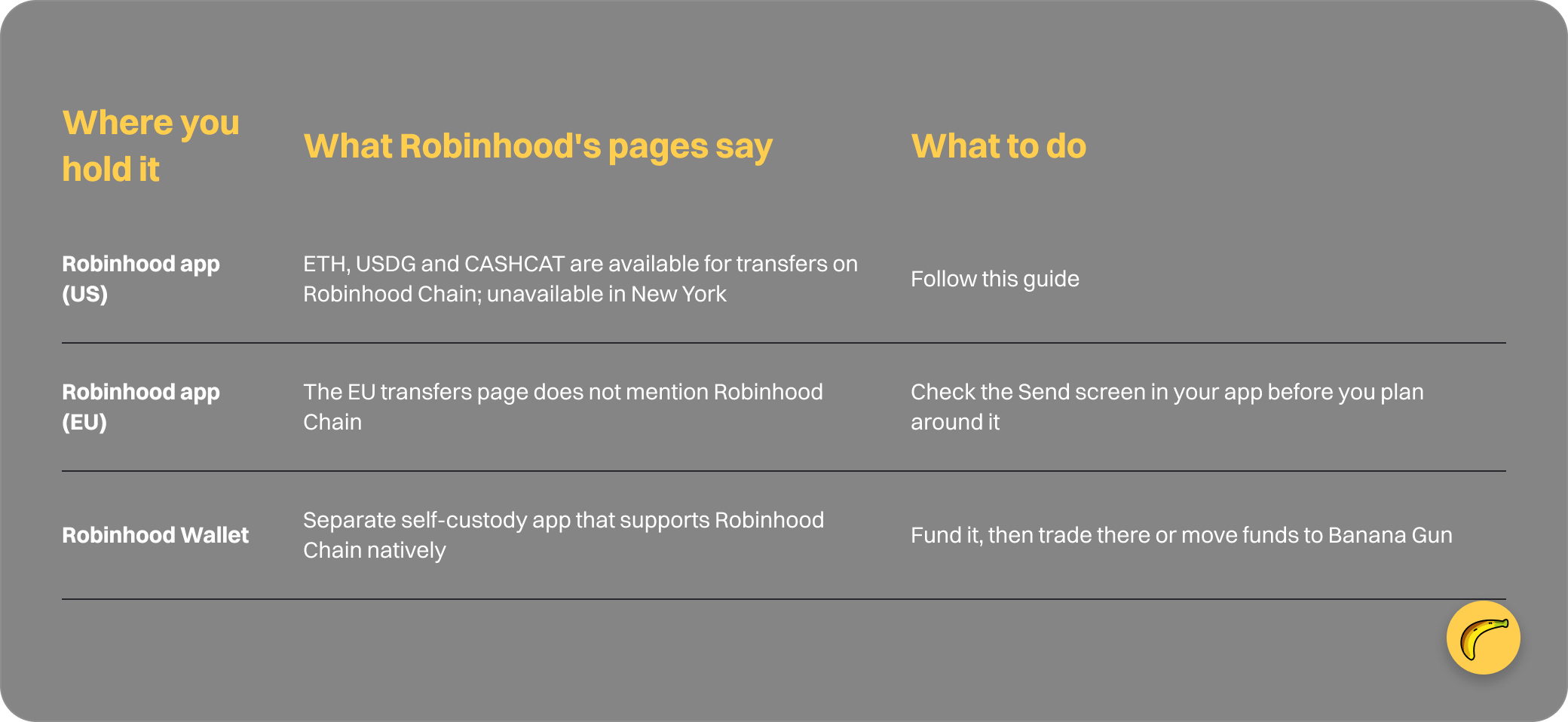
You can send ETH from the Robinhood app to a self-custody wallet on Robinhood Chain, then trade from that wallet in Banana Gun. Robinhood's crypto transfers page lists three assets as available on Robinhood Chain: ETH, USDG and CASHCAT.
You need a verified Robinhood account, a wallet address starting with 0x, and enough ETH to cover a network fee and your first trades. The route works in US states other than New York.
Where Robinhood's pages disagree, this guide follows the crypto transfers page.
Where your Robinhood crypto can go
Step 1: Check that you can send
1. Complete identity verification
Robinhood says you first need to verify your identity, and review can take up to 5 business days before crypto transfers are enabled. Do this before anything else, because every later step waits on it.
2. Check your region
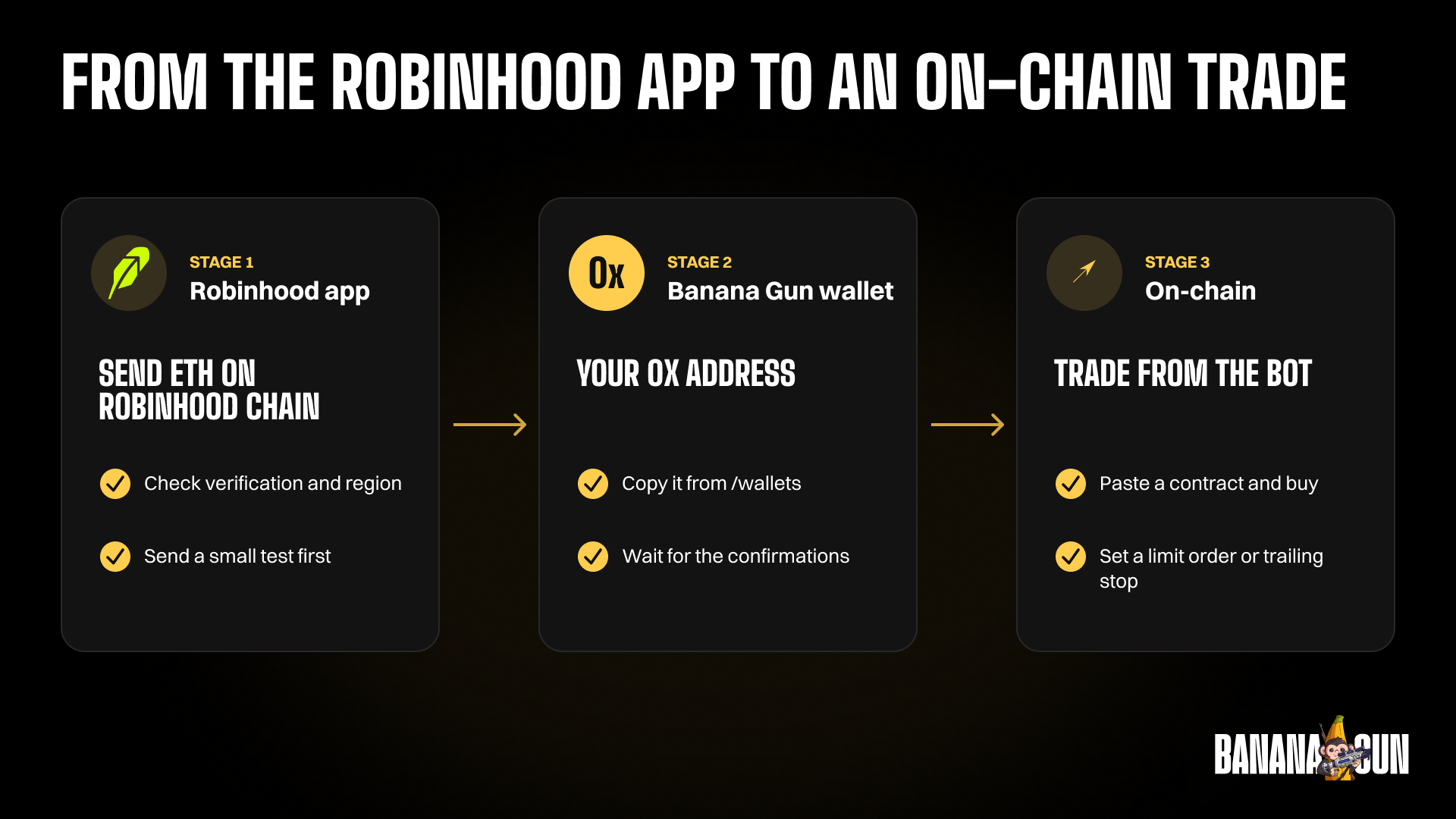
The US page says ETH, USDG and CASHCAT on Robinhood Chain are unavailable for transfers in New York. Outside the US, look at the Send screen in your own app. The EU transfers article does not mention Robinhood Chain.
Warning: Robinhood's separate Wallet article lists Ethereum, Bitcoin, Dogecoin, Solana and Polygon as transfer options from Robinhood Crypto, with no mention of Robinhood Chain. Rely on the transfers page, which lists ETH, USDG and CASHCAT on Robinhood Chain, and assume nothing broader.
3. Check the allowlist setting
If you turned on address allowlisting, new addresses go through a 48-hour maturation period and withdrawals to them are paused during the hold. The setting lives under Account, Menu, Crypto, Advanced security.
Step 2: Set up your Banana Gun wallet
1. Open the bot
Open t.me/BananaGun_bot and tap Start. Menu names can shift between bot updates, so if a label reads slightly differently, look for the closest match in the same menu.
2. Create or import a wallet
Choose Create Wallet or Import Wallet in the wallet setup menu. If you create one, the private key is shown once and Banana Gun cannot show it again, so store it before you leave the screen.
3. Copy the EVM address
Open /wallets and copy the address for the chain you are using. It should start with 0x, the same format Robinhood describes for Robinhood Chain.
Step 3: Send ETH from Robinhood
1. Open the asset
Go to the detail page for ETH in the Robinhood app and select Send.
2. Paste the address and pick the network
Paste your Banana Gun wallet address and make sure the network is Robinhood Chain. Robinhood warns that sending on an incompatible network can cause permanent loss, and that withdrawal addresses are not the same as deposit addresses. Never send back to a Robinhood address.
3. Enter the amount
Robinhood adds an estimated network fee on top. Its own example: send 100 DOGE with a 1 DOGE fee and 101 DOGE leaves your account. Send All takes the fee out of the amount instead. Robinhood charges nothing extra to receive crypto.
Warning: crypto transfers are final. Once sent, they cannot be canceled or reversed, even by Robinhood. Compare the first and last characters of the pasted address with the bot screen.
4. Review and submit
Tap Review, check the address and the network, then Submit.
Step 4: Wait for the transfer and confirm it
1. Expect a delay
Robinhood says a security review typically takes a few minutes, and confirmations can take up to a few hours. Withdrawal limits depend on your verification level, your history and your payment methods; the page publishes no fixed number.
2. Watch the balance in the bot
Your ETH should appear on Robinhood Chain in the wallet balance. If you want proof of arrival, search your wallet address on robinhoodchain.blockscout.com, the explorer listed in Robinhood's docs.
Step 5: Find a token and buy it
1. Pick a token
Open the Trending page in Banana Gun Pro and select Robinhood, or read our guide to token discovery tools for Robinhood.
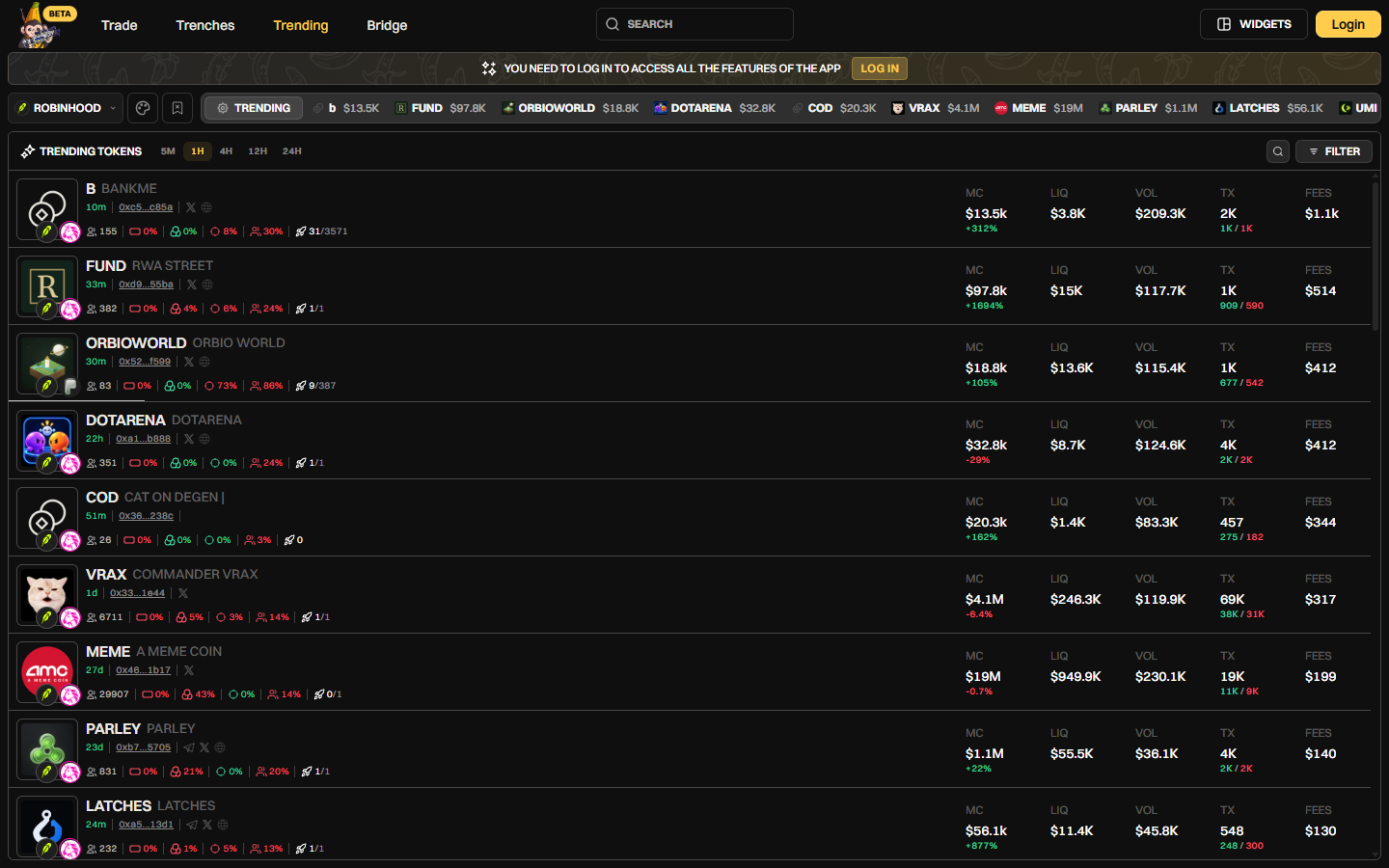
Banana Gun Pro Trending page on Robinhood Chain with the 1H timeframe selected, 1 October 2026
Example: in that capture, the token FUND showed a $97.8K market cap with $15K of liquidity. Check liquidity before you pick a size.
2. Paste the contract in the bot
Copy the full contract address from a source you trust, paste it into the bot, and review the buy menu. A pre-trade sell check blocks tokens you cannot sell, before the buy.
3. Confirm the buy
Choose a size and confirm. Banana Gun charges 1% on chains other than Ethereum, which includes Robinhood Chain, according to docs.bananagun.io.
Gas is ETH. Keep some ETH aside so a later sell has something to pay with.
Step 6: Set an exit
1. Add a limit order or trailing stop
Banana Gun supports limit orders on Robinhood Chain. Set the size and trigger before the token moves. A take-profit that is never reached never sells.
2. Reserve ETH for the sell
A sell uses gas too. Leave a buffer in the wallet.
Why it didn't work

Quick recap
- Verify your identity and confirm your region supports the transfer.
- Set up your Banana Gun wallet and copy its EVM address.
- Send ETH from the Robinhood app to that address on Robinhood Chain.
- Wait for the transfer and check your balance.
- Find a token, paste its contract and buy.
- Set a limit order or trailing stop.
Frequently asked questions
Can I send crypto from Robinhood to a wallet?
Yes. Robinhood's crypto transfers page says you select Send on the crypto's detail page, paste the receiving address, enter an amount and submit. Which coins and networks work depends on your region.
Which assets can I send to Robinhood Chain from the app?
Per the US transfers page: ETH, Global Dollar (USDG) and Cash Cat (CASHCAT). New York is excluded. Do not assume other assets work.
How much does it cost to transfer from Robinhood?
Robinhood charges a network fee that is estimated and added to your amount, and no extra fee to receive crypto. It publishes no fixed dollar figure on the page.
How long does a Robinhood crypto transfer take?
Robinhood says confirmations can take up to a few hours, after a security review that typically takes a few minutes.
Can I trade on Robinhood Chain with Banana Gun?
Yes. Banana Gun supported Robinhood Chain from day one, with market buys, limit orders and copy trading. See Banana Gun on Robinhood Chain or learn to copy trade on Robinhood Chain with Banana Gun.
Open Banana Gun at t.me/BananaGun_bot to set up your wallet and receive your first transfer.