

A honeypot is a token you can buy but cannot sell. The quickest test on Ethereum or Base is to paste the contract into honeypot.is, which simulates a buy and a sell before you spend anything.
One bad token can trap your whole position. This page walks through seven checks with a real result for PEPE on Ethereum, then covers Robinhood Chain, where honeypot.is does not work and GoPlus does.

Check 1: Get the right contract address
Look at: the full contract address, not the name or ticker.
Where: the project's own link, or the token row on Banana Gun Pro. Copy the address from there and paste it into every checker.
Bad result: you searched a name and picked the first match. Copycat tokens reuse popular names, so one ticker can return several contracts.
Example: on 1 October 2026 a search for VRAX on the Robinhood Chain explorer returned at least five different token contracts, one of them named "VRAX holder Airdrop Now". A name search cannot tell you which one is the project's. Match the whole address, character by character, against a source you trust.
Check 2: Run the simulation on honeypot.is
Look at: the headline risk label and the trading pair the tool picked.
Where: honeypot.is has pages for Ethereum, BSC and Base, with links at the top to switch between them. Paste the address into Token address and press Check for honeypot.
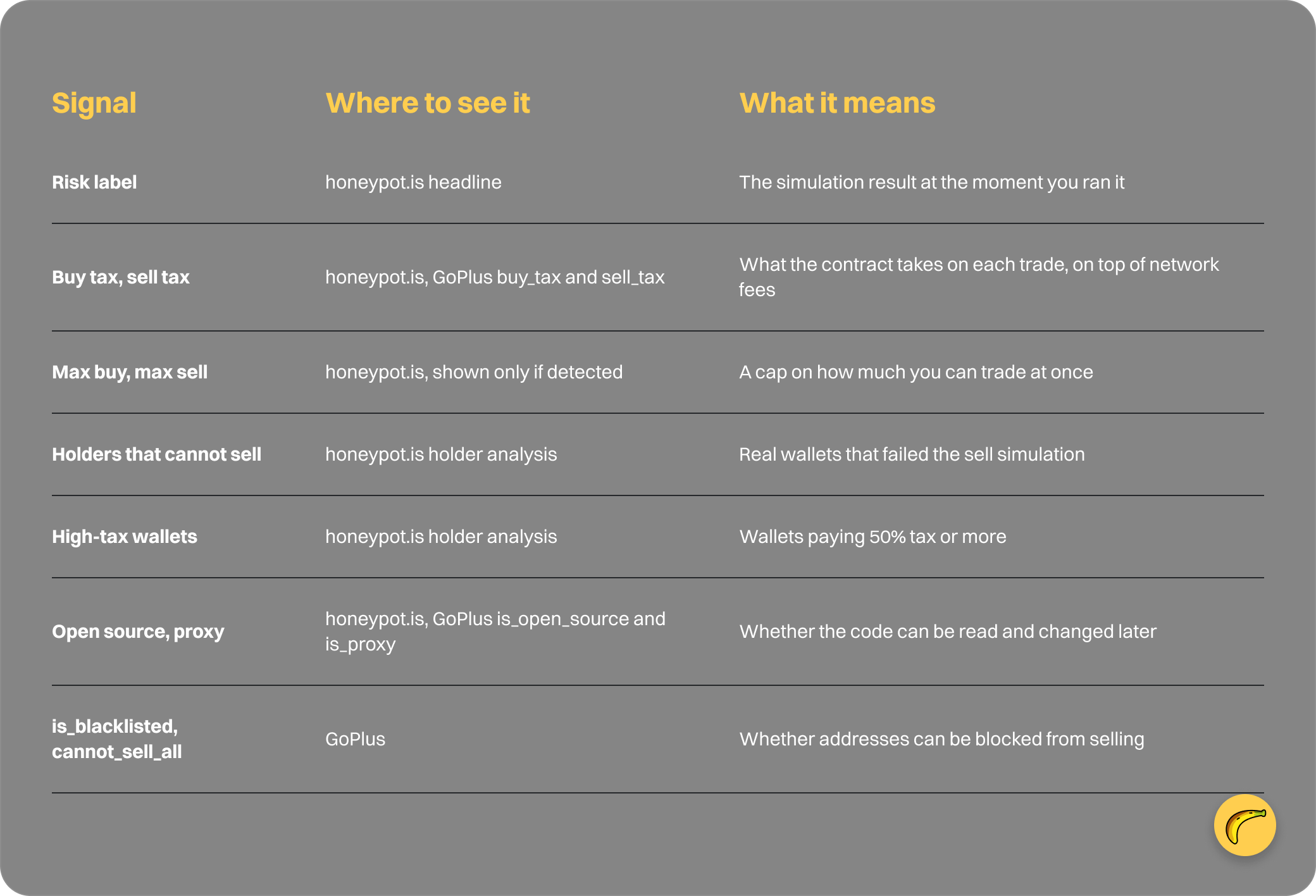
Bad result: the label reads honeypot, or a high risk level. The site says it simulates a buy and a sell to decide, and adds extra checks to reduce false results.
Example: the PEPE contract 0x6982508145454Ce325dDbE47a25d4ec3d2311933 on Ethereum came back as "Low risk of honeypot" on the Uniswap V2 PEPE-WETH pair, which showed $31.8M in liquidity.

honeypot.is result for PEPE on Ethereum: low risk, 0.0% buy and sell tax, no limits detected, 1 October 2026
Right under the label, the page says "This can always change". Read that as a real limit. A token that passes today can add a restriction tomorrow, so a clean result describes the moment you ran it.
Check 3: Read the buy tax and sell tax
Look at: the buy tax and sell tax figures lower on the result.
Where: the same honeypot.is result page, below the headline.
Bad result: a sell tax far above the buy tax. The etz-swap Academy puts it this way: a token with a 90% sell tax is technically sellable, but the holder loses nearly all the value. GoPlus warns that a tax raised above 49% can make a token untradeable, and that scammers often keep the tax low at launch and raise it once people have bought.
Example: PEPE showed a buy tax of 0.0% and a sell tax of 0.0%. A token listing 0% to buy and 90% to sell passes a "can you sell" test and still takes nearly everything on exit.
A tax is separate from the network fee and from price impact, so it stacks on top of both.
Check 4: Look for trade limits and blacklists
Look at: max buy and max sell limits, then blacklist flags.
Where: honeypot.is shows limits only when it detects them, according to its API docs. For blacklists, use the GoPlus token checker at gopluslabs.io/token-security, which returns an is_blacklisted field. The honeypot.is API fields we reviewed include no blacklist flag.
Bad result: a max sell limit smaller than your position, or a contract that can blacklist addresses. CertiK describes the most basic honeypot as one where the buyer is added to a blacklist after purchase and then blocked from selling.
Example: the PEPE result showed no buy or sell limit detected. A blacklist that adds you after you buy is a case a pre-buy simulation can miss.
Check 5: Read the holder analysis
Look at: how many holders were analysed, how many could sell and how many could not.
Where: the holder section of the honeypot.is result.
Bad result: a large share of failed sells, or wallets paying 50% tax or more. The API docs define high-tax wallets as those paying at least 50%.
Example: for PEPE the page analysed 14,282 holders. 14,281 could sell and 1 could not.
One failure in 14,282 is not a pattern. If the same table showed thousands of failures, you would walk away. Judge the ratio first, then look for a reason if the tool gives one.
Check 6: Check the contract code and proxy status
Look at: whether the contract code is open source and whether the token is a proxy.
Where: the contract-code details in honeypot.is, or the is_open_source and is_proxy fields on GoPlus.
Bad result: closed source on a contract involved in the trade, or a proxy. honeypot.is requires every contract called during the buy and sell process to be open source. The etz-swap Academy notes that an upgradeable proxy can keep the same public address while an administrator changes the logic underneath, so an older review may no longer describe current behavior.
Example: a proxy token that passed a check last week is the one to rerun right before you buy.
Check 7: Use GoPlus for Robinhood Chain
Look at: is_honeypot, cannot_sell_all, is_blacklisted, transfer_pausable, slippage_modifiable, hidden_owner and is_mintable.
Where: the GoPlus token checker. GoPlus lists Robinhood Chain (chain ID 4663) among the 46 chains it supported on 1 October 2026.
Bad result: any of those flags set to 1, or an error where you expected data. honeypot.is does not cover this chain: a request with chainID 4663 returned code 400 and the message "Invalid chain" on 1 October 2026, and its web tool lists only Ethereum, BSC and Base.
Example: run the address through GoPlus for chain ID 4663 and read the same questions you asked on honeypot.is: tax, sellability, blacklist, owner powers. Our beginner guide to reading a token contract covers the contract side in more depth.
Token Sniffer lists Robinhood Chain among its 16 chains if you want a second opinion. Do not push slippage up to see whether a sale goes through. The etz-swap Academy says blindly raising slippage is not a reliable test for an unknown contract, and every extra point of slippage is price you may pay.
What Banana Gun checks for you
Banana Gun runs a pre-trade sell check that blocks tokens you cannot sell. It happens before the buy, and the bot's feature list calls it honeypot detection.
The limits matter. We do not claim this check re-runs when a limit order or a copy trade fires. It does not turn a sellable token with a 90% sell tax into a good trade, and it is not a rug check, which is a different problem.
Anti-MEV is also on by default, using private transactions. It protects the transaction in transit and has no bearing on what the contract does after you buy. Our comparison of default protections across bots shows what is switched on out of the box.
Signal reference
Frequently asked questions
How does a honeypot checker work?
It simulates a buy and a sell against the token's contract and reports whether the sell goes through, plus taxes and holder data. honeypot.is says its tool also runs extra checks to reduce false results.
Is honeypot.is accurate?
It is a free simulation, and the site states it is not foolproof: a token that passes now can change. Treat the result as a snapshot and recheck right before you buy.
Does honeypot.is work for Robinhood Chain?
No. On 1 October 2026 its API returned "Invalid chain" for chain ID 4663, and its web tool lists Ethereum, BSC and Base. GoPlus supports Robinhood Chain.
Can a token pass a honeypot check and still lose you money?
Yes. A high sell tax, a blacklist added after you buy, or a proxy contract that changes later can all sit behind a clean pre-buy simulation.
Does Banana Gun check for honeypots on Base?
Banana Gun lists honeypot detection as a bot feature, and Base is one of its networks. The check blocks tokens you cannot sell before the buy; it is not a rug check. Chain-by-chain coverage of the check is not spelled out in the docs we reviewed.
Open Banana Gun on Telegram, paste the contract you just checked, and review the buy menu before you confirm.